Based on the network created in my last post, I’ll now describe how to calculate the catchment area of a network node.
We need both network and node table. The cost attribute in my network table is called traveltime. (I used different speed values based on road category to calculate traveltime for road segments.) The result will be a new table containing all nodes and an additional cost attribute. And this is the query that calculates the catchment area around node #5657:
create table catchment_5657 as
select
    id,
    the_geom,
    (select sum(cost) from (
	   SELECT * FROM shortest_path('
	   SELECT gid AS id,
		  start_id::int4 AS source,
		  end_id::int4 AS target,
		  traveltime::float8 AS cost
	   FROM network',
	   5657,
	   id,
	   false,
	   false)) as foo ) as cost
from node
Then, I loaded the point table into QGIS and calculated a TIN based on the cost attribute. With “Contour” from GdalTools, you can visualize equal-cost areas even better:
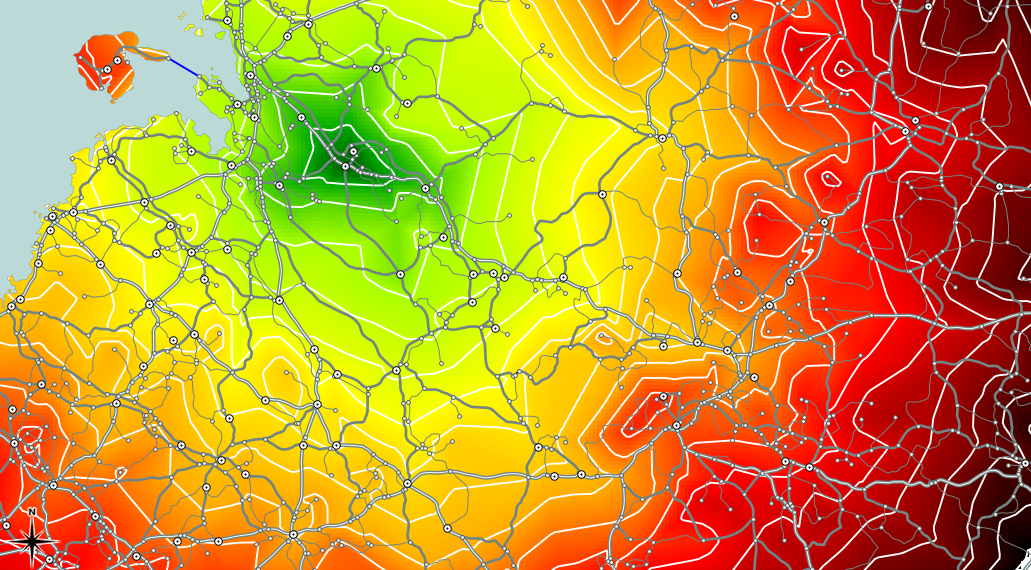
Catchment area around node #5657 with contour lines
Between contour lines, there is a difference of 10 minutes travel time.
If you are looking for a faster way to calculate small catchment areas (relative to the network size), check “Catchment Areas with pgRouting driving_distance().
 Free and Open Source GIS Ramblings