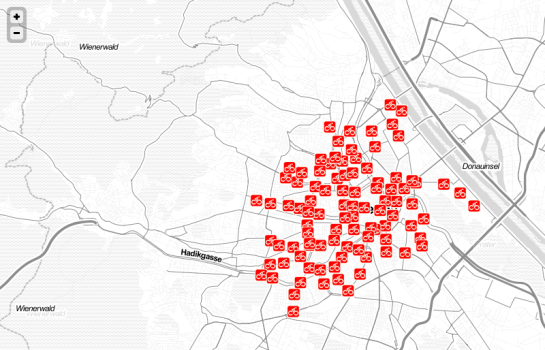
Today’s post is a note-to-self on how to set up a really quick little Leaflet web map with Stamen’s “Toner” background and a WMS overlay served by QGIS Server.
Note the use of the map parameter when creating the QGIS Server WMS layer.
<!DOCTYPE html PUBLIC "-//W3C//DTD XHTML 1.0 Strict//EN" "http://www.w3.org/TR/xhtml1/DTD/xhtml1-strict.dtd">
<html xmlns="http://www.w3.org/1999/xhtml" xml:lang="en" lang="en">
<head>

<meta http-equiv="content-type" content="text/html; charset=utf-8" />
<meta http-equiv="content-language" content="en" />

<title>Leaflet, Stamen Toner and QGIS Server</title>

<link rel="stylesheet" href="http://leaflet.cloudmade.com/dist/leaflet.css" />
<link rel="stylesheet" href="my.css" type="text/css" />
 <!--[if lte IE 8]><link rel="stylesheet" href="http://leaflet.cloudmade.com/dist/leaflet.ie.css" /><![endif]-->

<script type="text/javascript" src="http://leaflet.cloudmade.com/dist/leaflet.js"></script>
<script type="text/javascript" src="http://maps.stamen.com/js/tile.stamen.js?v1.1.3"></script>
<script type="text/javascript">
function initialize() {
	var stamen = new L.StamenTileLayer("toner-lite");

	var myLayer = new L.TileLayer.WMS("http://10.101.21.28/cgi-bin/qgis_mapserv.fcgi", {
		map: "/usr/lib/cgi-bin/test/test.qgs",
		layers: 'mylayer',
		format: 'image/png',
		transparent: 'TRUE',
	});

	var map = new L.Map("map", {
		center: new L.LatLng(48.2,16.4),
		zoom: 13,
 		minZoom: 10,
 		maxZoom: 18,
		layers: [stamen,myLayer],
	});
}
</script>

</head>

<body onload="initialize()">
    <div id="map" class="map"></div>
</body>

</html>
With this my.css, the map will be displayed in “full screen”.
  div.map{
    display:block;
    position:absolute;
    top:0;
    left:0;
    width:100%;
    height:100%;
  }
Update
You can test an extended live example at http://anitagraser.github.com/Webmapping-Sandbox/leaflet.html


 Free and Open Source GIS Ramblings