Archive

Author Archives: underdark

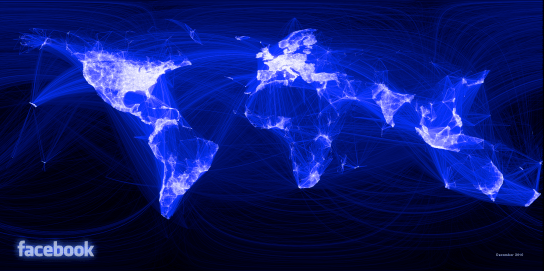
Paul Butler, an intern at facebook, has created a map of facebook relationships. Relationships are represented by great circle arcs connecting the locations of two friends. The result is a great looking map of the relationships on facebook:

Interesting (… but scary)!

Vincos from vincosblog has compiled a series of world maps showcasing the distribution of different social networks worldwide and the changes over the last 18 months. The maps clearly show facebook taking over :
World Map of Social Networks

The “1st Conference on Spatial Statistics 2011” is going to take place from 23rd – 25th of March 2011 at the University of Twente, Enschede, The Netherlands. Topics include:

  • Mapping global change
  • Spatial and spatio-temporal statistical methodology
  • Environmental issues
  • Ecological and habitat changes
  • Health and epidemiology
  • Economy and energy
  • Image use and analysis
  • Developing countries

http://www.sethoscope.net hosts a really neat Python script for heatmap creation.

The script takes data points with latitude and longitude coordinates (list of points or a GPX track log) and plots them on a map so areas where points are dense show brightly.

Nice extras include: GPX tracks can be rendered as line segments instead of disconnected points. You can generate animations using ffmpeg. The heatmaps can be put on top of OpenStreetMap tiles.

The script is released under AGPL making it free to improve and share.

Maybe this is a bit off-topic, but I just spent quite some time on this and I need to write it down so I can look it up again later :)

These are instructions for Ubuntu running Postgres 8.4. By default, Postgres ships without PL/Python so we need to get it first:

sudo apt-get install postgresql-plpython-8.4

Next, we need to create the language for our database. I’m using PgAdmin3. From there, I ran:

CREATE PROCEDURAL LANGUAGE 'plpython' HANDLER plpython_call_handler;

This should have been it. Let’s try with a simple function:

CREATE FUNCTION replace_e_to_a(text) RETURNS text AS
'
import re
Text1 = re.sub(''e'', ''a'',args[0])
return Text1
'
LANGUAGE 'plpython';

SELECT replace_e_to_a('Meee');

… should return ‘Maaa’.

Now for the juicy part: Let’s create an INSERT trigger function!

First, let’s have a look at the corresponding table structure. We have two tables “user_data” and “user_keywords”. “user_data” is the table that’s being filled with information from external functions. “user_keywords” has to be kept up-to-date. It is supposed to count the appearance of keywords on a per-user base.

user_data                                   user_keywords
user_id, event_id, keywords                 user_id, keyword,   count
1,       1,        'music,rock'             1,       'music',   2
1,       2,        'music,classic'          1,       'rock',    1
                                            1,       'classic', 1

First, the keyword list has to be split. Then a row has to be inserted for new keywords (compare insert_plan) and the counter has to be increased for existing keywords (update_plan).

The values that are about to be inserted can be accessed via TD[“new”][“column_name”].

CREATE FUNCTION update_keyword_count() RETURNS trigger AS '

keywords = TD["new"]["keywords"]
user = TD["new"]["user_id"]

insert_plan = plpy.prepare("INSERT INTO user_keywords (keyword, count, user_id) VALUES ($1, $2, $3)", ["text", "int", "int"])

update_plan = plpy.prepare("UPDATE user_keywords SET count = $3 WHERE user_id = $1 AND keyword = $2", ["int", "text", "int"])

for keyword in keywords.split(","):
  select_cnt_rows = plpy.prepare("SELECT count(*) AS cnt FROM user_keywords WHERE user_id = $1 AND keyword = $2", ["int", "text"])
  cnt_rows = plpy.execute(select_cnt_rows, [user, keyword])

  select_plan = plpy.prepare("SELECT count AS cnt FROM user_keywords WHERE user_id = $1 AND keyword = $2", ["int", "text"])
  results = plpy.execute(select_plan, [user, keyword])

  if cnt_rows[0]["cnt"] == 0:
   rv = plpy.execute(insert_plan, [keyword, 1, user])
  else:
   rv = plpy.execute(update_plan, [user, keyword, results[0]["cnt"]+1])

' LANGUAGE plpython;

Now, we need to wire it up by defining the trigger:

CREATE TRIGGER update_keywords
BEFORE INSERT ON user_data
FORE EACH ROW
EXECUTE PROCEDURE update_keyword_count();

… Wasn’t that bad ;)
Interesting news from the gispython.org community mailing list: There is a new Python library out there called PyKML.

PyKML allows parsing and authoring of KML documents based on the lxml.objectify API which provides Pythonic access to XML documents.

Nathan from woostuff.wordpress.com has compiled a descriptive comparison of MapInfo and QGIS. He presents the up and downsides of QGIS compared to one of the major commercial GIS around. 

The QGIS community presents two new case studies:

QGIS and GRASS applied to paleontological survey in Western Portugal by André Mano
QGIS as major GIS software in the Laboratory on Experimental and Applied Geography by Jakub Trojan

GeoServer has always been good at simply publishing database tables. But anything more complex (e.g. pre-filtering data in a table, joining two tables together, or generating values on the fly) could be painful. With Geoserver 2.1 one can finally create a layer directly from an SQL query.

"Create New SQL View" interface

Even dynamic queries are possible, e.g.

select gid, state_name, the_geom from pgstates where persons between %low% and %high%

To select for example all states with 2 to 5 millions inhabitants, the following parameters can be added to the normal GetMap request:

&viewparams=low:2000000;high:5000000

Find more information on SQL layers in Geoserver 2.1 documentation.

Globe plugin had it’s first big presentation at FOSS4G 2010:

(This video is part of a series of videos titled “Comparison of Open Source Virtual Globes”.)

Where to download Globe plugin

The globe plugin is a C++ plugin based on the threading branch and can be
downloaded from
http://github.com/sourcepole/qgis/tree/threading-globe

How to install QGIS Globe

To install Globe plugin, you can use Marco Bernasocchi’s install script. Thanks Marco!

Sourcepole (the developers of Globe plugin) promise that as soon as the threading branch is merged into trunk, globe should make its way into trunk as well.