The enhancement request Support for “selected features only” in “Select by location” is now implemented.
Thanks Carson!
The enhancement request Support for “selected features only” in “Select by location” is now implemented.
Thanks Carson!
Three new label editing tools found their way into the QGIS developer version:
These tools allow you to mix fixed label positions and automatic label positioning inside a project. If the x or y attribute value is NULL, the position will be set automatically. When a label position is changed using “move label tool”, the position is written into the attribute fields and the label position for this feature is fixed.
To use these tools on existing layers, add x, y and rotation attribute fields (type double). By default, all values will be NULL and thus the layer will be labeled automatically. Now you’re ready to move and rotate the labels as you like.
For more information check: www.sourcepole.com
The biggest Austrian GIS Conference “Symposium und Fachmesse für Angewandte Geoinformatik” (AGIT) is once more going to take place in Salzburg from July, 6th – 8th 2011. Papers can be submitted from Dec, 1st 2010 until Feb, 1st 2011. There’s an extended deadline until Feb, 21st 2011 for non-paper submissions.
More information: AGIT – Call for Papers 2011
The evolution of QGIS since July 2002:

QGIS Release Timeline
A cartogram is a map where some variable (e.g. population) is substituted for land area or distance. The geometry of the map is distorted to convey the information of this variable.
“Cartogram Creator” is a Python plugin for QGIS available through Carson Farmer’s repository.

Cartogram Creator icon
To use this plugin, you need a polygon layer with the attribute you want to be represented in the cartogram. I’m using a small file of Austrian regions with population data:
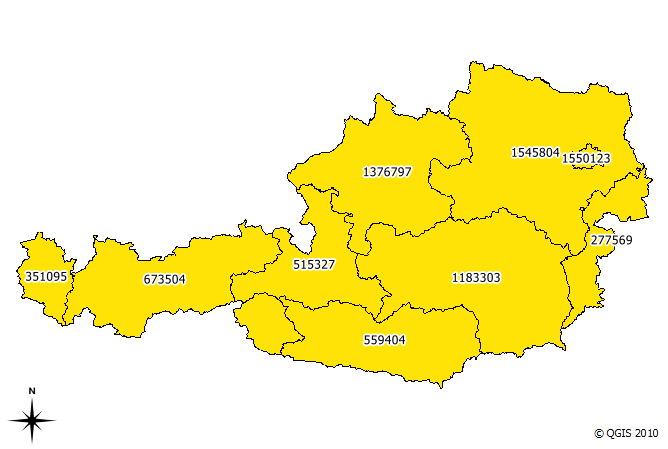
base data (Austrian regions and number of inhabitants)
The small island in the north-east is Vienna, the Austrian capital. With more than 1.5 million inhabitants, it is the region with highest population. This fact should be visible in the resulting cartogram.
I chose to run five iterations of the plugin algorithm. The plugin allows saving of each iteration’s result. This is how the shape of the region changes through the iterations:
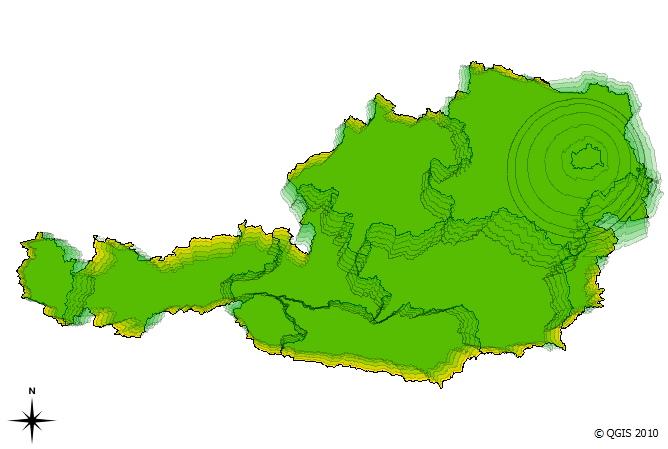
cartogram iterations (n=5)
We can see Vienna “growing”. The final result looks like this:
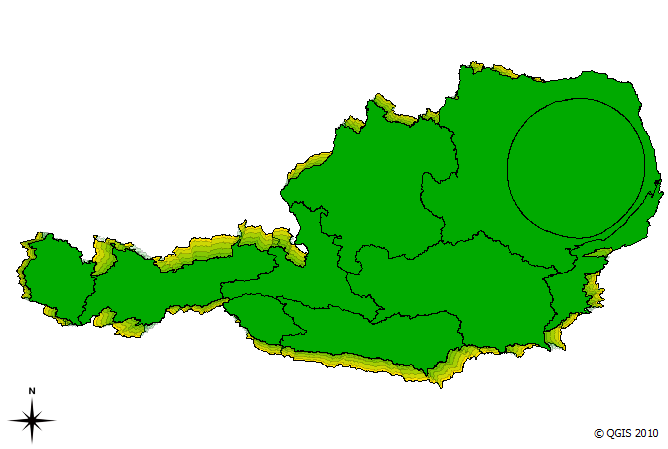
cartogram result after five interations
The cartogram shows pretty clearly that the Vienna region is home to a considerable population.
MMQGIS is a set of Python plugins for manipulating vector map layers in Quantum GIS. […] MMQGIS does offer some useful tools missing from native QGIS or common plugin sets …
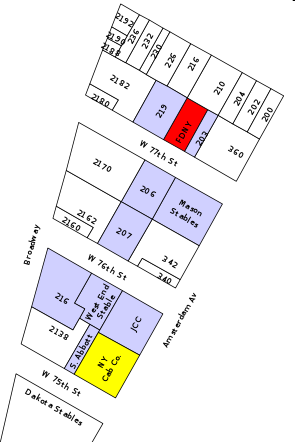
Labels Layer example
MMQGIS currently contains the following tools:
The project homepage is located at michaelminn.com.
The following code snippet contains the constructor of a GUI control class for QGIS plugins. It’s job is to initialize the plugin GUI (a dock widget in this case) and create signal connections:
import os
from PyQt4.QtCore import *
from PyQt4.QtGui import *
from PyQt4 import uic
from qgis.core import *

class MyGuiControl(QObject):
    """This class controls all plugin-related GUI elements."""

    def __init__ (self,iface):
        """initialize the GUI control"""
        QObject.__init__(self)
        self.iface = iface

        # load the form
        path = os.path.dirname( os.path.abspath( __file__ ) )
        self.dock = uic.loadUi( os.path.join( path, "mywidget.ui" ) )
        self.iface.addDockWidget( Qt.RightDockWidgetArea, self.dock )

        # connect to gui signals
        QObject.connect(self.dock...
        ...
Using uic.loadUi is a convenient way to create a user interface with minimum effort. Of course the performance might be better if we compile the .ui code to python first, but during development phase this saves us an extra step.
For some plugins it’s necessary to save the settings inside the QGIS project file. Saving is done with this simple one-liner:
QgsProject.instance().writeEntry(pluginName, setting, value)
Then you just need to save the project.
Reading is performed with one of the following functions:
QgsProject.instance().readEntry (pluginName, setting) # for strings
QgsProject.instance().readNumEntry (pluginName, setting)
QgsProject.instance().readDoubleEntry (pluginName, setting)
QgsProject.instance().readBoolEntry (pluginName, setting)
QgsProject.instance().readListEntry (pluginName, setting)
You’ll find the corresponding API documentation at: http://doc.qgis.org/stable/classQgsProject.html. As you can see, you can only read/write simple data types. To allow the plugin developer to save more complex plugin settings, I filed an enhancement request.
To handle all those different read functions in a convenient way, I created the following functions:
def readSetting(self,func,setting):
    """read a plugin setting from QgsProject instance"""
    value,ok = func('pluginName',setting)
    if ok:
        return value
    else:
        return None

def readSettings(self,setting,value):
    """read plugin settings from QgsProject instance"""
    # map data types to function names
    prj = QgsProject.instance()
    functions = { 'str' : prj.readEntry,
                  'int' : prj.readNumEntry,
                  'float' : prj.readDoubleEntry,
                  'bool' : prj.readBoolEntry,
                  'pyqtWrapperType' : prj.readListEntry # QStringList
                }

    dataType = type(value).__name__
    return = self.readSetting(functions[dataType],setting)
readSettings() has to be supplied with the name of the setting and an example or default value for the setting (from which we can determine the data type of the setting). Of course this can be done in many different ways. In Time Manager plugin, readSettings() receives a dictionary of all settings that have to be read. The function then loops through the dictionary and reads the available settings.
FOSSGIS is the biggest German-speaking user conference for free geographic information systems and free geodata. It’s taking place at the university of Heidelberg from April, 5th – 7th 2011. The Call for Papers is open until November, 29th 2010.
The conference focuses primarily on a German audience. However, the program committee will also consider applications for talks or workshops held in English if they are deemed to add to the quality of the conference. So if you don’t speak German, but are a FOSS/Open Data celebrity, or have a story that only you can tell, do submit your talk.
Adding a unique ID to an (editable) layer in QGIS is easy:

QGIS Field Calculator Operators incl. "rownum"
 Free and Open Source GIS Ramblings