More Color Ramps for QGIS
Colorbrewer is a great resource for visually pleasing gradients that can be used for mapping. It was already possible to use color brewer ramps in QGIS but it was necessary to create the ramp with the final number of classes in mind.
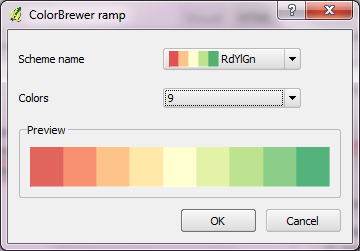
Creating a Colobrewer ramp
That’s why I sat down and created continuous ramps from the Colorbrewer data:

Colorbrewer Ramps in QGIS Style Manager
If you want to use them, just import the following XML file into QGIS Style Manager: https://github.com/anitagraser/QGIS-resources/tree/master/symbols
For a big selection of point, line and polygon styles check “QGIS symbology set” by S.S. Rebelious.
 Free and Open Source GIS Ramblings
Bravo! Great work and thanks for sharing.
Thank you! They are beautiful!
Fantastic work, thank you!
Thank you for sharing!
Woohoo! That made my day
That’s great! Thanks so much.
Another great post Anita! Why not put these into core?
Regards
Tim
Hi Tim,
Martin Dobias already added them to core if I’m not mistaken.
Best wishes,
Anita
I do not see them in recent master – please add them. Thanks a lot.
Hi Paolo,
Looks to me like they were added already: https://github.com/qgis/Quantum-GIS/tree/master/resources
Or am I misunderstanding something?
Best wishes
this could be the most stupid question. I was able to load the xml…now how can use the ramps? When I load a DEM I only have gray scale , pseudocolor, freakout and color map. I tried to use “load style”, but it asks me for a *.qml file. I am stupidily lost..
Thanks before hand
Gerardo
Hi Gerardo,
These ramps are usable for vector layers only. For rasters there is a very useful plugin for creating raster color tables called “1-Band Raster Color Table”
thanks for the advice!
Me again,
Just to let you know that “1 Band raster color table” plugin does not work in Qgis 1.7. The plugin installer warns that works up to 1.6, I installed it on a 1.7 machine and it crashes. Tested in my other installs and the same.
Saludos
Gerardo
Great ramps! Will definitely put those to use.
Playing with custom .svg symbols. I’ve used this tutorial
http://www.sourcepole.ch/svg-symbols-in-qgis-with-modifiable-colors
which allows the symbol color to be changed within QGIS. However I was really looking to apply color ramps to them. Any chance of directing me to where I can get more info to make this happen?
thanks!
Interesting idea! I’ve tried to apply color ramps to SVG symbols but it doesn’t seem to work. This issue should be reported.
Hi underdark,
I downloaded your file colorbrewer_symbols.xml. when I go into the stylemanager , click the color-ramp tab and then click the import-button I get an error-message: “An error occured during import: Could not parse the style file”
Any hints, what I am doing wrong? I am using qgis 1.74 running on windows 64 bit.
thank you very much
Kurt
problem solved: my downloaded file was corrupted. Downloaded it again. now it works like a charm :-)
thanks
Kurt
Greetings,
is it possible to reverse the order of a color ramp created with ColorBrewer?
Thanks.
I don’t think that’s currently possible (in 1.8.0). I think something like that has been added in the developer version.