Print Composer 2.0 – Take #3
After guide lines and multi-column legends, today’s focus is on
Overview maps
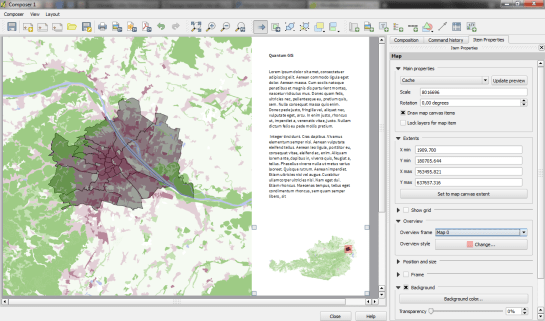
Small overview maps are used to help the reader get an idea of where the region displayed on the main map is located. In the new Print Composer, it’s simple to add such overviews: Add the main map as usual. Then add another map object to the composition an go to the “Overview” section. There, you can specify that the second map object should be an overview map for the first one: Just specify “Map 0” in the dropdown list:
 Free and Open Source GIS Ramblings
Looks fantastic! An iideas, when the developer-version will be come the main (stable) version?
thx
Kurt
The release schedule states June, 7th (http://osgeo-org.1560.n6.nabble.com/Feature-freeze-commencing-the-ides-of-March-tt5038020.html).
Thank you for this info. now its clear want to do in the summer holidays
Kurt
Pingback: Some cool new features in the upcoming QGIS 2.0 | Ecostudies
Thanks for all your excellent posts (where this one is just one example)! Really inspiring!
Pingback: Todo lo que necesitas saber sobre QGIS 2.0 Dufour | MappingGIS