10 December 2010 – The Open Geospatial Consortium (OGC®) announces adoption and availability of the OGC Georeferenced Table Joining Service (TJS) Implementation Standard, Version 1.0. The TJS standard is available for free download at http://www.opengeospatial.org/standards/tjs.
The OGC TJS standard defines an interface for services that provide the ability to join attribute data stored in one database on a network with corresponding geometry (points, lines, or polygons) stored in another network accessible database.
Author Archives: underdark
Advanced Layer Styles in QGIS
1 Comment
New symbology has been around for quite a while now, but the last weeks have seen some great new additions to this functionality. Let’s have a look at what can be achieved:
Arrow styles
Using ‘Marker Placement’ options in ‘Marker Line’, we can now create fancy arrows pointing in or against line direction.

Arrow style for line layers using 'Marker Lines' and specialized marker placement
Rails style
Using ‘Marker Line’, we can also create nice looking railway styles. The ‘sleepers’ are created using vertical line markers at certain intervals.
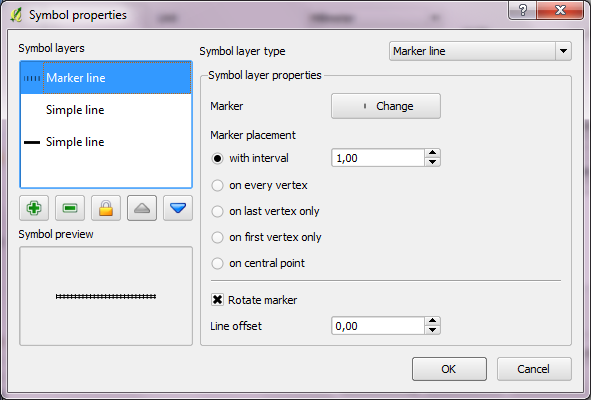
Rail style with 'Marker Line' at certain interval
Polygon styles
Besides normal and SVG polygon fill styles, new symbology now offers centroid and outline styles. Outline styles offer all options found in line style dialog (simple, marker and line decoration).
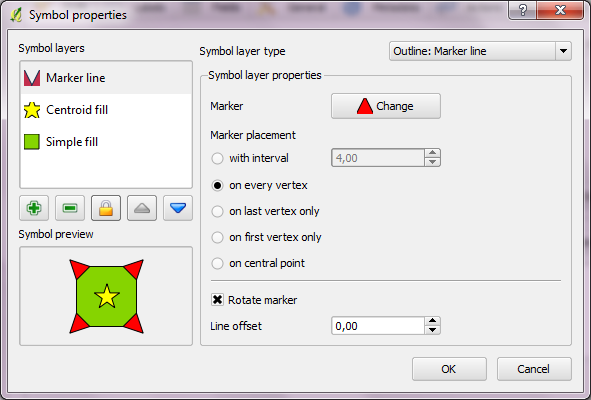
Fun polygon style using fill, outline and centroid layer
QGIS Symbology Improvements for 1.7
QGIS community has developed some interesting new features over the last weeks:
- Nathan Woodrow has created a graphical rule builder for rule based vector symbology. Rule based symbologies allow you to create classes of features based on custom rules. Now, you don’t need to write those rules manually anymore.
- Martin Dobias has implemented functionality that allows you to treat the outline of polygons as a separate entity. This way, you can render a polygon with one or more line styles. Additionally, you can render a marker on the polygon centroid.
The time of old symbology is running out. It will not be available for QGIS 2.0 anymore, but who will miss it? The development speed of QGIS symbology in the last months has been simply astonishing!
QGIS Christmas Wishlist
This year, the QGIS community is not writing their wish lists to Santa Claus. This year, we get to send our wishes to kCube!
You will find the wish list on the QGIS Wiki. The page is aimed at collecting ideas for features and tasks that can be assigned to the 6 months of developer time being donated by kCube Consulting. Later, there will be a poll to find the most useful contributions.
Have your say and post your ideas! And don’t hesitate to follow kCube’s example ;)
Online Batch Geocoding
I used to go to batchgeo.com for geocoding address lists, but last time I visited, I couldn’t find where to download the resulting list with lat/lon values.
Luckily, there’s another service available that will do: GPSVisualizer.com. They offer several options for geocoding: single address, address list, and a service for tabular data. Like batchgeo.com, they use Yahoo’s geocoding API to do the actual work.
Facebook Friendship Map
Paul Butler, an intern at facebook, has created a map of facebook relationships. Relationships are represented by great circle arcs connecting the locations of two friends. The result is a great looking map of the relationships on facebook:
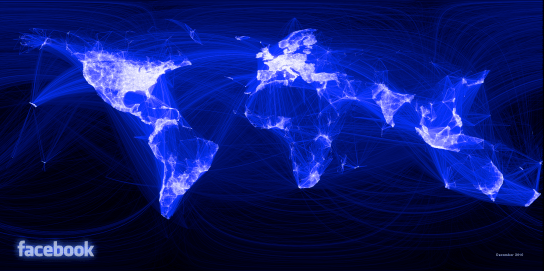
Interesting (… but scary)!
Vincos from vincosblog has compiled a series of world maps showcasing the distribution of different social networks worldwide and the changes over the last 18 months. The maps clearly show facebook taking over :

1st Conference on Spatial Statistics 2011
The “1st Conference on Spatial Statistics 2011” is going to take place from 23rd – 25th of March 2011 at the University of Twente, Enschede, The Netherlands. Topics include:
- Mapping global change
- Spatial and spatio-temporal statistical methodology
- Environmental issues
- Ecological and habitat changes
- Health and epidemiology
- Economy and energy
- Image use and analysis
- Developing countries
Simple Heatmaps Using Python
http://www.sethoscope.net hosts a really neat Python script for heatmap creation.
The script takes data points with latitude and longitude coordinates (list of points or a GPX track log) and plots them on a map so areas where points are dense show brightly.
Nice extras include: GPX tracks can be rendered as line segments instead of disconnected points. You can generate animations using ffmpeg. The heatmaps can be put on top of OpenStreetMap tiles.
The script is released under AGPL making it free to improve and share.
PL/Python – Pythonic Trigger Functions for Postgres
Maybe this is a bit off-topic, but I just spent quite some time on this and I need to write it down so I can look it up again later :)
These are instructions for Ubuntu running Postgres 8.4. By default, Postgres ships without PL/Python so we need to get it first:
sudo apt-get install postgresql-plpython-8.4
Next, we need to create the language for our database. I’m using PgAdmin3. From there, I ran:
CREATE PROCEDURAL LANGUAGE 'plpython' HANDLER plpython_call_handler;
This should have been it. Let’s try with a simple function:
CREATE FUNCTION replace_e_to_a(text) RETURNS text AS
'
import re
Text1 = re.sub(''e'', ''a'',args[0])
return Text1
'
LANGUAGE 'plpython';

SELECT replace_e_to_a('Meee');
… should return ‘Maaa’.
Now for the juicy part: Let’s create an INSERT trigger function!
First, let’s have a look at the corresponding table structure. We have two tables “user_data” and “user_keywords”. “user_data” is the table that’s being filled with information from external functions. “user_keywords” has to be kept up-to-date. It is supposed to count the appearance of keywords on a per-user base.
user_data                                   user_keywords
user_id, event_id, keywords                 user_id, keyword,   count
1,       1,        'music,rock'             1,       'music',   2
1,       2,        'music,classic'          1,       'rock',    1
                                            1,       'classic', 1
First, the keyword list has to be split. Then a row has to be inserted for new keywords (compare insert_plan) and the counter has to be increased for existing keywords (update_plan).
The values that are about to be inserted can be accessed via TD[“new”][“column_name”].
CREATE FUNCTION update_keyword_count() RETURNS trigger AS '

keywords = TD["new"]["keywords"]
user = TD["new"]["user_id"]

insert_plan = plpy.prepare("INSERT INTO user_keywords (keyword, count, user_id) VALUES ($1, $2, $3)", ["text", "int", "int"])

update_plan = plpy.prepare("UPDATE user_keywords SET count = $3 WHERE user_id = $1 AND keyword = $2", ["int", "text", "int"])

for keyword in keywords.split(","):
  select_cnt_rows = plpy.prepare("SELECT count(*) AS cnt FROM user_keywords WHERE user_id = $1 AND keyword = $2", ["int", "text"])
  cnt_rows = plpy.execute(select_cnt_rows, [user, keyword])

  select_plan = plpy.prepare("SELECT count AS cnt FROM user_keywords WHERE user_id = $1 AND keyword = $2", ["int", "text"])
  results = plpy.execute(select_plan, [user, keyword])

  if cnt_rows[0]["cnt"] == 0:
   rv = plpy.execute(insert_plan, [keyword, 1, user])
  else:
   rv = plpy.execute(update_plan, [user, keyword, results[0]["cnt"]+1])

' LANGUAGE plpython;
Now, we need to wire it up by defining the trigger:
CREATE TRIGGER update_keywords
BEFORE INSERT ON user_data
FORE EACH ROW
EXECUTE PROCEDURE update_keyword_count();
… Wasn’t that bad ;)
PyKML – A Python KML library
Interesting news from the gispython.org community mailing list: There is a new Python library out there called PyKML.
PyKML allows parsing and authoring of KML documents based on the lxml.objectify API which provides Pythonic access to XML documents.
 Free and Open Source GIS Ramblings