Archive

Author Archives: underdark

FOSSGIS is the biggest German-speaking user conference for free geographic information systems and free geodata. It’s taking place at the university of Heidelberg from April, 5th – 7th 2011. The Call for Papers is open until November, 29th 2010.

The conference focuses primarily on a German audience. However, the program committee will also consider applications for talks or workshops held in English if they are deemed to add to the quality of the conference. So if you don’t speak German, but are a FOSS/Open Data celebrity, or have a story that only you can tell, do submit your talk.

Adding a unique ID to an (editable) layer in QGIS is easy:

  1. Turn editing on and
  2. go to field calculator, there you can
  3. add a new column and
  4. populate it using “rownum”

QGIS Field Calculator Operators incl. "rownum"

Sometimes, we just want to visualize the contents of a PostGIS table containing some x/y data but no actual geometries in QGIS. But there the problems arise: We don’t have the right to add a geometry column, the table doesn’t have a suitable ID or OIDs (QGIS demands a unique integer ID) and we can’t or don’t want to mess with the database anyway. Loading the table with “Add PostGIS Layer” will result in a non-spatial layer (or fail if you use an older QGIS versions).

RT Sql Layer Plugin to the rescue!

I presented this plugin in a previous post. It allows you to execute any SQL SELECT statement, even really complex ones. Luckily, this time we don’t need anything fancy, only the two functions row_number() and makepoint():

select  
  row_number() over (order by col1)::int AS my_id,
  col1, 
  col2,
  x, y, 
  makepoint(x,y) as the_geom
from my_table

Have you ever wondered how to comfortable visualize PostGIS queries? Meet “RT Sql Layer” a powerful and comfortable QGIS plugin that allows building and visualizing queries on your PostGIS data.

RT Sql Layer comes with a graphic query builder:

RT Sql Layer Query Builder dialog

It allows saving/loading of queries to speed up your work flow.

The query results will be loaded as a new layer:

Loaded query layer

RT Sql Layer is available through Faunalia Plugin Repository.

For another great example on what can be achieved with this plugin, read Carson Farmer’s post on “pgRouting, OpenStreetMap, and QGIS” where he describes how to build your own routing database and visualize routing results in QGIS with RT Sql Layer.

More on RT Sql Layer: How to create Point Layers from x/y Data on the fly with PostGIS and QGIS

For a while now, QGIS releases have been named after moons. This will change with the next release 1.6:

All releases from 1.6 forward will be named after a place on earth, preferably a very obscure place with an interesting story behind it.

You can submit your name suggestions on the QGIS Wiki page.

Looking for a great resource to learn about map projections? Stop searching and go to Carlos A. Furuti’s Map Projection Pages.

Kudos to Matt Wilkie from gis.stackexchange for the link.

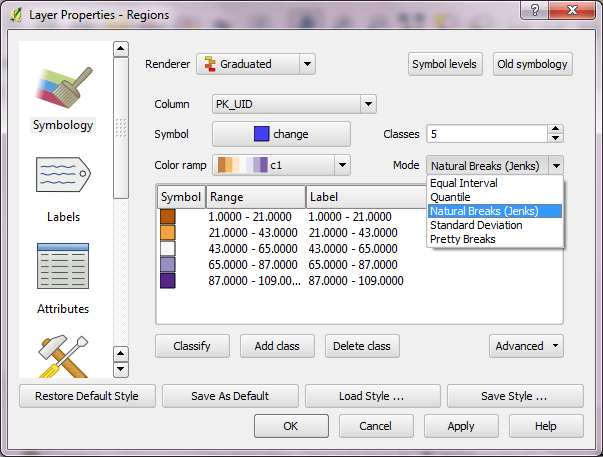
Carson Farmer has written some new classification functions for QGIS. QGIS 1.5 only has “Equal Interval” and “Quantiles” classification algorithms implemented. Carson added the following algorithms to trunk:

  • Jenks Optimisation (or Natural Breaks)
  • Standard Deviation
  • R’s “Pretty” algorithm
QGIS classification algorithms

QGIS classification algorithms for layer symbology in current QGIS trunk version

Read more on his blog: “Playing around with classification algorithms: Python and QGIS” and “Adding a bit of class(ification) to QGIS…”

The aim of Time Manager plugin for QGIS is to provide comfortable browsing through temporal geodata. A dock widget provides a time slider and a configuration dialog for your layers to manage.

a wildlife telemetry dataset managed by Time Manager

Time Manager filters your vector datasets and displays only features with timestamps in the user specified time frame.

two views of the scenery, using a two-days time frame

Give it a try! The project website can be found at http://anitagraser.github.com/TimeManager/.

I just stumbled upon the following handy Firefox plugin:

WMS Inspector provides a set of tools for integrators and developers that work with the Web Map Service (WMS) standard. It aims to ease repetitive tasks like debugging requests or checking which individual services are used from an online mapping application. It also focuses on provide a user-friendly output of the different services’ capabilities.

https://addons.mozilla.org/en-US/firefox/addon/91406/

Justin O’Beirne from 41Latitude has compiled a thorough – and not that “brief” – comparison of Google Maps, Bing Maps and Yahoo! Maps: