Justin O’Beirne from 41Latitude has compiled a thorough – and not that “brief” – comparison of Google Maps, Bing Maps and Yahoo! Maps:
A Comparison of Google, Bing and Yahoo! Maps
1 Comment
Justin O’Beirne from 41Latitude has compiled a thorough – and not that “brief” – comparison of Google Maps, Bing Maps and Yahoo! Maps:
Now that FOSS4G 2010 is over, we’re looking forward to next year. The free and open source GIS community is going to meet in Denver from September 12-16, 2011.
I just stumbled upon this interesting piece of code for visualization of network flow on gis.stackexchange.com: It’s called “Flow Map Layout” and was developed at Standford University (project page).

Flow Map Layout mapped on a globe
The corresponding paper describes the methodology and shows interesting example uses.
Discontinuous or Interrupted Projections like the Butterfly Map are certainly exotic. But does that also mean that there are no open source GIS supporting them?

Butterfly Map example
This question on gis.stackexchange.com is awaiting an answer :)
Update:
Using Generic Mapping Tools (GMT) it seems relatively easy to create a map showing an Interrupted Sinusoidal Projection. Here’s an example out of their manual (PDF, page 121):

World map using the Interrupted Sinusoidal projection
For all of us who couldn’t attend FOSS4G in Barcelona this year there are some of the great workshops available online:
You can call almost any function in Python, using “grass.run_command(“function”, ….)”.
For your inspiration, you find GRASS Python scripts in their SVN.
Great news everyone: Since revision r14172, QGIS supports non-spatial tables! This means you can finally load your CSV files directly into QGIS and work with them, e.g. use “Join by attribute”.
Loading the CSV file is performed using “Add Vector layer”. (Yes, the terminology is a little confusing here.) The resulting layer will be shown in the legend list and the content can be view via attribute table.
Great work Marco!
Heat up your maps!
The project is called “OLHeatmap” and the results look promising:

an "inverted heatmap"
Try it out yourself using the Live Demo.
You find the project’s homepage at Sourceforge.
While this is not a new addition to QGIS anymore – in fact it has been around since 1.4 – I feel it’s not as widely know as it should be: QGIS offers the power of ColorBrewer to create color ramps! And this is how you get to use this power:
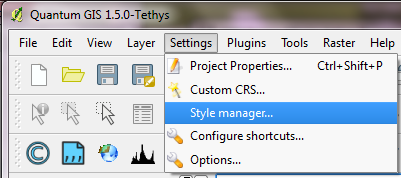
All styles: marker, line, fill and color ramps can be accessed via “Style manager”:
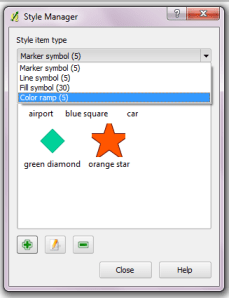
In Style Manager you can add, edit and delete styles:
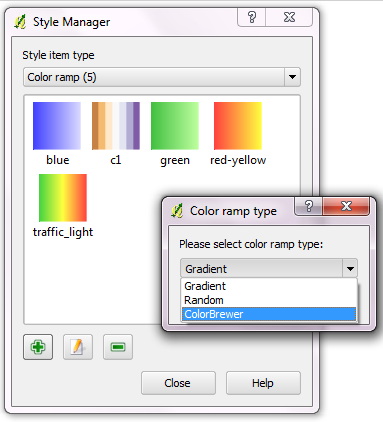
When creating a new color ramp, you get to choose between “Gradient”, “Random” and finally “ColorBrewer” ramp type. (By the way: You can create multi-color color ramps if you choose “Gradient”.)
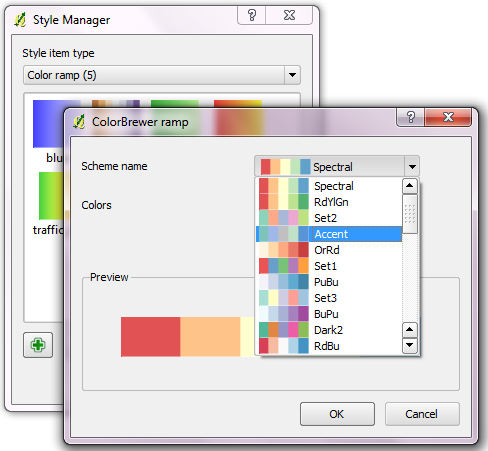
When creating a ColorBrewer ramp, you can choose from various schemes and define how many colors your ramp should contain:
I love these new ramps and I wish I’d have discovered them sooner :)
Enjoy the power of ColorBrewer and QGIS!
 Free and Open Source GIS Ramblings