QGIS styling options have advanced a lot in the last releases. But there’s always something more we would love to have … Greedy users! 
Inkscape and other graphics programs can do it: Gradient fills.
Inspired by a question on gis.stackexchange, I tried to create something as close to a gradient fill as possible.
What I came up with is a symbol consisting out of multiple stacked “simple line” layers. The top-most layer is the dark outer border and every following layer is getting lighter and growing towards the center of the polygon (using a positive offset value). Important options are flat cap styles for all line layers and – of course – enabled symbol levels.
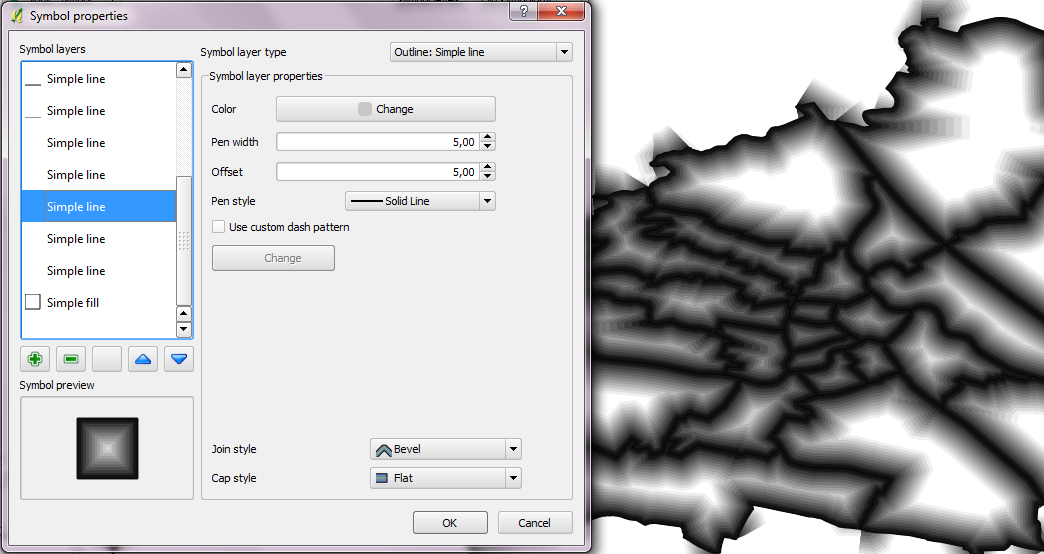
A "gradient" fill in QGIS
As you can see, the gradient looks quite fine inside the polygons. For the edges, it would be necessary to add a mask hiding the unclean rendering. Or maybe there is another solution which I just couldn’t think of?

Nicer map using a mask
This is the symbol source if you want to try it. Paste it into your symbology-ng-style.xml document.
    <symbol outputUnit="MM" alpha="1" type="fill" name="gradient">
      <layer pass="0" class="SimpleFill" locked="0">
        <prop k="color" v="255,255,255,255"/>
        <prop k="color_border" v="0,0,0,255"/>
        <prop k="offset" v="0,0"/>
        <prop k="style" v="solid"/>
        <prop k="style_border" v="solid"/>
        <prop k="width_border" v="1"/>
      </layer>
      <layer pass="0" class="SimpleLine" locked="0">
        <prop k="capstyle" v="flat"/>
        <prop k="color" v="240,240,240,255"/>
        <prop k="customdash" v="5;2"/>
        <prop k="joinstyle" v="bevel"/>
        <prop k="offset" v="6"/>
        <prop k="penstyle" v="solid"/>
        <prop k="use_custom_dash" v="0"/>
        <prop k="width" v="6"/>
      </layer>
      <layer pass="0" class="SimpleLine" locked="0">
        <prop k="capstyle" v="flat"/>
        <prop k="color" v="220,220,220,255"/>
        <prop k="customdash" v="5;2"/>
        <prop k="joinstyle" v="bevel"/>
        <prop k="offset" v="5.5"/>
        <prop k="penstyle" v="solid"/>
        <prop k="use_custom_dash" v="0"/>
        <prop k="width" v="5.5"/>
      </layer>
      <layer pass="0" class="SimpleLine" locked="0">
        <prop k="capstyle" v="flat"/>
        <prop k="color" v="200,200,200,255"/>
        <prop k="customdash" v="5;2"/>
        <prop k="joinstyle" v="bevel"/>
        <prop k="offset" v="5"/>
        <prop k="penstyle" v="solid"/>
        <prop k="use_custom_dash" v="0"/>
        <prop k="width" v="5"/>
      </layer>
      <layer pass="0" class="SimpleLine" locked="0">
        <prop k="capstyle" v="flat"/>
        <prop k="color" v="180,180,180,255"/>
        <prop k="customdash" v="5;2"/>
        <prop k="joinstyle" v="bevel"/>
        <prop k="offset" v="4.5"/>
        <prop k="penstyle" v="solid"/>
        <prop k="use_custom_dash" v="0"/>
        <prop k="width" v="4.5"/>
      </layer>
      <layer pass="0" class="SimpleLine" locked="0">
        <prop k="capstyle" v="flat"/>
        <prop k="color" v="160,160,160,255"/>
        <prop k="customdash" v="5;2"/>
        <prop k="joinstyle" v="bevel"/>
        <prop k="offset" v="4"/>
        <prop k="penstyle" v="solid"/>
        <prop k="use_custom_dash" v="0"/>
        <prop k="width" v="4"/>
      </layer>
      <layer pass="0" class="SimpleLine" locked="0">
        <prop k="capstyle" v="flat"/>
        <prop k="color" v="140,140,140,255"/>
        <prop k="customdash" v="5;2"/>
        <prop k="joinstyle" v="bevel"/>
        <prop k="offset" v="3.5"/>
        <prop k="penstyle" v="solid"/>
        <prop k="use_custom_dash" v="0"/>
        <prop k="width" v="3.5"/>
      </layer>
      <layer pass="0" class="SimpleLine" locked="0">
        <prop k="capstyle" v="flat"/>
        <prop k="color" v="120,120,120,255"/>
        <prop k="customdash" v="5;2"/>
        <prop k="joinstyle" v="bevel"/>
        <prop k="offset" v="3"/>
        <prop k="penstyle" v="solid"/>
        <prop k="use_custom_dash" v="0"/>
        <prop k="width" v="3"/>
      </layer>
      <layer pass="0" class="SimpleLine" locked="0">
        <prop k="capstyle" v="flat"/>
        <prop k="color" v="100,100,100,255"/>
        <prop k="customdash" v="5;2"/>
        <prop k="joinstyle" v="bevel"/>
        <prop k="offset" v="2.5"/>
        <prop k="penstyle" v="solid"/>
        <prop k="use_custom_dash" v="0"/>
        <prop k="width" v="2.5"/>
      </layer>
      <layer pass="0" class="SimpleLine" locked="0">
        <prop k="capstyle" v="flat"/>
        <prop k="color" v="80,80,80,255"/>
        <prop k="customdash" v="5;2"/>
        <prop k="joinstyle" v="bevel"/>
        <prop k="offset" v="2"/>
        <prop k="penstyle" v="solid"/>
        <prop k="use_custom_dash" v="0"/>
        <prop k="width" v="2"/>
      </layer>
      <layer pass="1" class="SimpleLine" locked="0">
        <prop k="capstyle" v="flat"/>
        <prop k="color" v="60,60,60,255"/>
        <prop k="customdash" v="5;2"/>
        <prop k="joinstyle" v="bevel"/>
        <prop k="offset" v="1.5"/>
        <prop k="penstyle" v="solid"/>
        <prop k="use_custom_dash" v="0"/>
        <prop k="width" v="1.5"/>
      </layer>
      <layer pass="2" class="SimpleLine" locked="0">
        <prop k="capstyle" v="flat"/>
        <prop k="color" v="40,40,40,255"/>
        <prop k="customdash" v="5;2"/>
        <prop k="joinstyle" v="bevel"/>
        <prop k="offset" v="1"/>
        <prop k="penstyle" v="solid"/>
        <prop k="use_custom_dash" v="0"/>
        <prop k="width" v="1"/>
      </layer>
      <layer pass="3" class="SimpleLine" locked="0">
        <prop k="capstyle" v="flat"/>
        <prop k="color" v="20,20,20,255"/>
        <prop k="customdash" v="5;2"/>
        <prop k="joinstyle" v="bevel"/>
        <prop k="offset" v="0.5"/>
        <prop k="penstyle" v="solid"/>
        <prop k="use_custom_dash" v="0"/>
        <prop k="width" v="1"/>
      </layer>
      <layer pass="4" class="SimpleLine" locked="0">
        <prop k="capstyle" v="flat"/>
        <prop k="color" v="10,10,10,255"/>
        <prop k="customdash" v="5;2"/>
        <prop k="joinstyle" v="bevel"/>
        <prop k="offset" v="0"/>
        <prop k="penstyle" v="solid"/>
        <prop k="use_custom_dash" v="0"/>
        <prop k="width" v="0.5"/>
      </layer>
    </symbol>


 Free and Open Source GIS Ramblings