Archive

GIS

With Martin’s latest addition of conditional statements it’s now even easier to get conditional labels in QGIS. Following up on the example used in my previous post, we can simplify

substr(osm_name, 0, (clazz = 11 or clazz = 13 or clazz = 15 or clazz = 21)*-1)

to

CASE WHEN (clazz = 11 or clazz = 13 or clazz = 15 or clazz = 21) THEN osm_name END

which is much easier to read and remember.

To avoid roads from being labeled with only their road numbers, I added an additional check that the “osm_name” is longer than six characters. Thanks to Nathan’s syntax highlighting this new and powerful expression based labeling is also comfortable to use.

Conditional labels for an osm2po layer

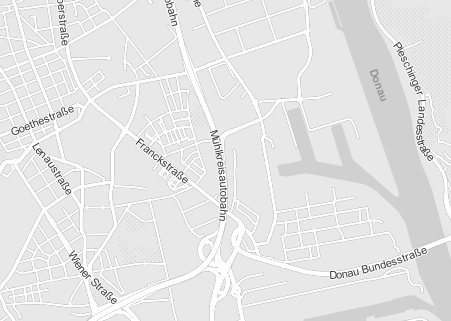
The latest QGIS development build (1.9.90) has a new feature “expression based labeling” which can be used to create conditional labels. One typical use case would be if you want to label only certain (high-level) road classes in your road layer. By default, QGIS labels the features rather randomly:
default labeling

How can we label only the more important roads? Here is an example using OSM data imported into PostGIS using osm2po:

If you have loaded OSM using osm2po, your OSM table will contain a “clazz” attribute. (Check osm2po.config for the exact mapping.) To label only motorways, trunks, primary and secondary roads and nothing else, I wrote this labeling expression:

substr(osm_name, 0, (clazz = 11 or clazz = 13 or clazz = 15 or clazz = 21)*-1)

If clazz equals 11, 13, 15 or 21, the expression returns the value of osm_name. Otherwise it returns an empty string. (All checks will return false or 0 which causes the function to evaluate to substr(osm_name,0,0).) Kudos to Giuseppe Sucameli who explained this on the mailing list.

expression based "conditional" labels
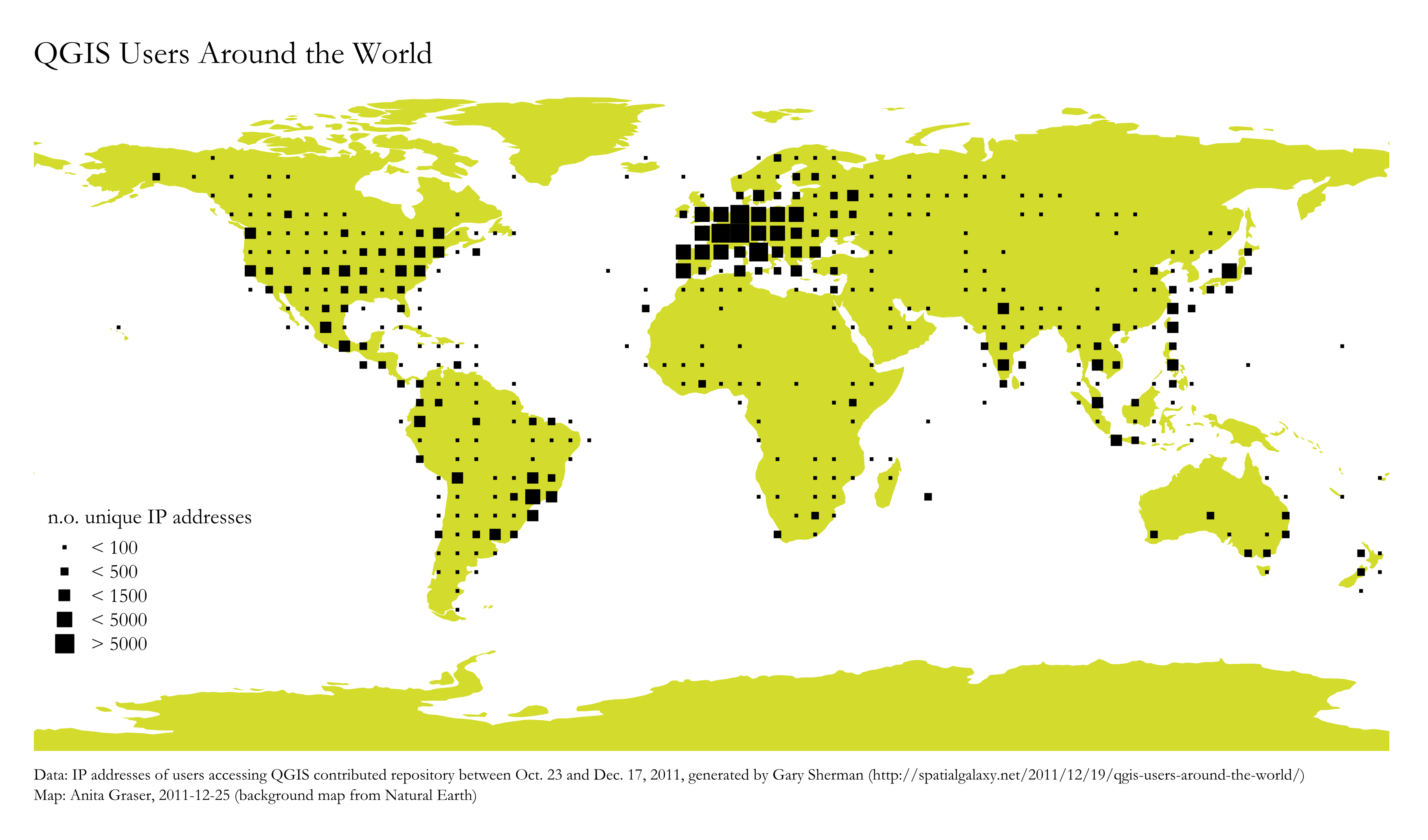
For “QGIS Users Around the World” Gary Sherman collected and geocoded a few weeks of accesses to the plugin repositories. This map is my first attempt at mapping the data for use in QGIS publications:

Considering the coarse resolution of geocoded IP addresses, I’ve decided to count the number of unique IP addresses within each area (5×5 degrees). We can make out a lot of activity in Europe, Japan, Brazil and the US. The high number of accesses from the US mid west are due to IPs being mapped to country-level only.

I would love to hear your feedback on this one!

TimeManager is now available on Github (right beside pgRoutingLayer).

If you want to try it, you can install version 0.4 from the new QGIS Plugin Repository. I’ve also uploaded some test data such as the twitter file used for the animation I presented recently.

This post summarizes how to install sphinx on Windows to contribute to PyQGIS Cookbook. I’m writing this as I go, so this most likely won’t be perfect.

I used my Python 2.6 stand-alone installation (not the one in OSGeo4W).

  1. Get the Sphinx egg from http://pypi.python.org/pypi/Sphinx
  2. If you don’t have it, install setuptools to get the easy_install script http://pypi.python.org/pypi/setuptools
  3. In C:\Python26\Scripts run easy_install -U sphinx
  4. Get the PyQGIS source from https://github.com/qgis/QGIS-Developer-Cookbook
  5. Create a build folder inside the QGIS-Developer-Cookbook
  6. Now you can build the Cookbook: sphinx-build "C:\Users\Anita\QGIS\QGIS-Developer-Cookbook\source" "C:\Users\Anita\QGIS\QGIS-Developer-Cookbook\build"

The build folder should now contain the Cookbook .html files.

I’ve set up a GitHub repo where I will publish QGIS resources such as symbols and styles: https://github.com/anitagraser/QGIS-resources

You can already find symbols/styles described in these posts:

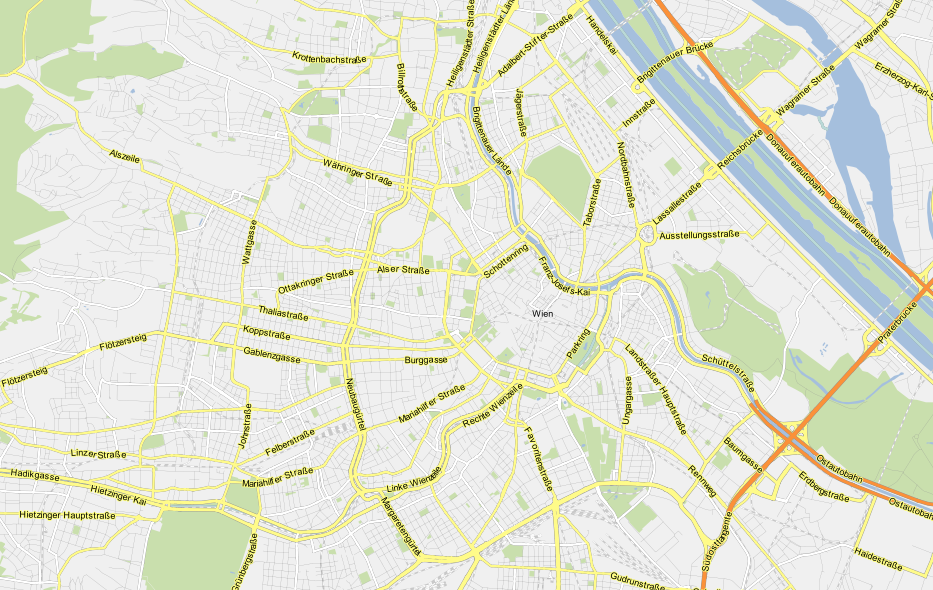
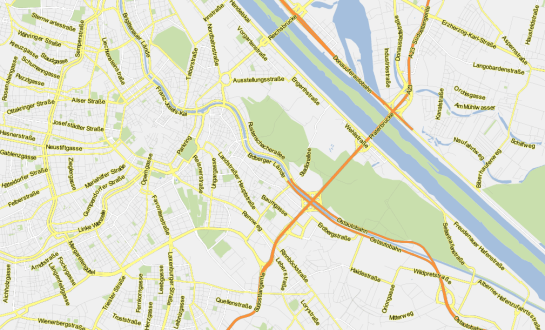
It’s Dec, 23rd and this is my early present to the QGIS community: a package of ready-to-use road symbols that make your OpenStreetMap data look like Google Maps.

In a previous post, I did already show how to prepare a view that will help get similar looking road labels. And now, here are the necessary symbols: osm_symbols.xml (Load using “Style Manager”.)

Now, you should have all necessary symbols available to create the style. I used the following rules to get the map shown above:

rules for "Google Maps" style

You can download the style here: v_osm_roads_style.qml

Merry Christmas!

OSM styled like "Google Maps"

PS: For water and natural areas, I used Cloudmade’s natural.shp

This is the follow up post to “An osm2po Quickstart” which covers loading the OSM network into PostGIS and using the result with pgRouting. After parsing the OSM file, e.g.

C:\Users\Anita\temp\osm2po-4.2.30>java -jar osm2po-core-4.2.30-signed.jar prefix=at "C:\Users\Anita\Geodaten\OpenStreetMap Data\austria.osm.pbf"

you should find a folder with the name of the prefix you chose inside the osm2po folder. It contains a log file which in turn provides a command line template for importing the OSM network into PostGIS, e.g.

INFO commandline template: psql -U [username] -d [dbname] -q -f "C:\Users\Anita\temp\osm2po-4.2.30\at\at_2po_4pgr.sql"

Using this template, we can easily import the .sql file into an exiting database. My pgRouting-enabled database is called wien_ogd.

C:\Users\Anita\temp\osm2po-4.2.30\at>psql -U [username] -d wien_ogd -q -f C:\Users\Anita\temp\osm2po-4.2.30\at\at_2po_4pgr.sql

Now, the data is ready for usage in QGIS:

The osm2po table in QGIS

Using “pgRouting Layer” plugin, it’s now straightforward to calculate shortest paths. I had to apply some changes to the plugin code, so please get the latest version from Github.

A shortest path in osm2po network

Using osm2po turned out to be far less painful than I expected and I hope you’ll find this post useful too.

This post covers the necessary steps to use osm2po on Windows. Osm2po is both, a converter and a routing engine. It parses OpenStreetMap data and makes it routable. While osm2pgrouting seems to be limited by the amount of memory that is available on your system, osm2po is able to convert large sets like europe.osm. It generates SQL Insert scripts for PostGIS, compatible with pgRouting and Quantum GIS.

To get started, download osm2po and an OSM binary file like e.g. austria.osm.pbf. Extract osm2po and you’ll find the .jar file together with the tool’s documentation (German only though).

That’s all, you’re ready!

To load your network from the .pbf run:

C:\Users\Anita\temp\osm2po-4.2.30>java -jar osm2po-core-4.2.30-signed.jar prefix=at "C:\Users\Anita\Geodaten\OpenStreetMap Data\austria.osm.pbf"

Once finished, you should be able to test the results by visiting http://localhost:8888/Osm2poService in your browser:

A shortest path using osm2po routing

Next up: How to use osm2po with pgRouting.

PgRouting is great. But (Yes, there is always a “but”.) those queries are not easy to remember. That’s why I started work on a pgRouting GUI today. It’s actually a QGIS plugin which I’ll call “pgRouting Layer” and it is based on Pablo T. Carreira’s “Fast SQL Layer” plugin which can execute arbitrary SQL statements against a PostGIS or SpatiaLite database and add the results in a map layer.

This first prototype supports pgRouting’s shortest_path() function as described in “A Beginners Guide to pgRouting”. Once supplied with the necessary information about attribute field names, the plugin allows you to route between pairs of nodes. For convenience, the resulting layer is named after its start and end node.

some shortest paths using "pgRouting Layer" plugin

Besides normal routing capabilities, I’d like to develop this plugin towards a user friendly tool for catchment zone analysis. If you are interested in teaming up to work towards this goal, let me know.