Archive

Author Archives: underdark

Today’s post is a first quick dive into Neo4J (really just getting my toes wet). It’s based on a publicly available Neo4J dump containing mobility data, ship trajectories to be specific. You can find this data and the setup instructions at:

Maryam Maslek ELayam, Cyril Ray, & Christophe Claramunt. (2022). A hierarchical graph-based model for mobility data representation and analysis [Data set]. Zenodo. https://doi.org/10.5281/zenodo.6405212

I was made aware of this work since they cited MovingPandas in their paper in Data & Knowledge Engineering“The implementation combines several open source tools such as Python, MovingPandas library, Uber H3 index, Neo4j graph database management system”

Once set up, this gives us a database with three hierarchical levels:

Neo4j comes with a nice graphical browser that lets us explore the data. We can switch between levels and click on individual node labels to get a quick preview:

Level 2 is a generalization / aggregation of level 1. Expanding the graph of one of the level 2 nodes shows its connection to level 1. For example, the level 2 port node “Audierne” actually refers to two level 1 nodes:

Every “road” level 1 relationship between ports provide information about the ship, its arrival, departure, travel time, and speed. We can see that this two level 1 ports must be pretty close since travel times are only 5 minutes:

Further expanding one of the port level 1 nodes shows its connection to waypoints of level1:

Switching to level 2, we gain access to nodes of type Traj(ectory). Additionally, the road level 2 relationships represent aggregations of the trajectories, for example, here’s a relationship with only one associated trajectory:

There are also some odd relationships, for example, trajectory 43 has two ends and begins relationships and there are also two road relationships referencing this trajectory (with identical information, only differing in their automatic <id>). I’m not yet sure if that is a feature or a bug:

On level 1, we also have access to ship nodes. They are connected to ports and waypoints. However, exploring them visually is challenging. Things look fine at first:

But after a while, once all relationships have loaded, we have it: the MIGHTY BALL OF YARN ™:

I guess this is the point where it becomes necessary to get accustomed to the query language. And no, it’s not SQL, it is Cypher. For example, selecting a specific trajectory with id 0, looks like this:

 MATCH (t1 {traj_id: 0}) RETURN t1

But more on this another time.


This post is part of a series. Read more about movement data in GIS.

This summer, I had the honor to — once again — speak at the OpenGeoHub Summer School. This time, I wanted to challenge the students and myself by not just doing MovingPandas but by introducing both MovingPandas and DVC for Mobility Data Science.

I’ve previously written about DVC and how it may be used to track geoprocessing workflows with QGIS & DVC. In my summer school session, we go into details on how to use DVC to keep track of MovingPandas movement data analytics workflow.

Here is the recording of the session live stream and you can find the materials at https://github.com/movingpandas/movingpandas-examples/blob/opengeohub2023/README.md


This post is part of a series. Read more about movement data in GIS.

Today, I want to point out a blog post over at

https://geocompx.org/post/2023/ogh23/

written together with my fellow “Geocomputation with Python” co-authors Robin Lovelace, Michael Dorman, and Jakub Nowosad.

In this blog post, we talk about our experience teaching R and Python for geocomputation. The context of this blog post is the OpenGeoHub Summer School 2023 which has courses on R, Python and Julia. The focus of the blog post is on geographic vector data, meaning points, lines, polygons (and their ‘multi’ variants) and the attributes associated with them. We plan to cover raster data in a future post.

Today, Jeff Sikes @box464@firefish.social, alerted me to the fact that “Twitter has removed all media attachments from 2014 and prior” (source: https://firefish.social/notes/9imgvtckzqffboxt). So far, it seems unclear whether this was intentional or a system failure (source: https://mas.to/@carnage4life/110922114407553901).

Since I’ve been on Twitter since 2011, this means that some media files are now lost. While the loss of a few low-res images is probably not a major loss for humanity, I would prefer to have some control over when and how content I created vanishes. So, to avoid losing more content, I have followed Jeff’s recommendation to create a proper archival page:

https://anitagraser.github.io/twitter-archive/

It is based on an export I pulled in October 2022 when I started to use Mastodon as my primary social media account. Unfortunately, this export did not include media files.

To follow me in the future, find me on:

https://fosstodon.org/@underdarkGIS

Btw, a recent study published on Nature News shows that Mastodon is the top-ranking Twitter replacement for scientists.

To find other interesting people on Mastodon, there are many useful tools and lists, including, for example:


Update 2023-11-04: I’ve completely deleted my X / Twitter account. If you find any account pretending they are me on that platform, it’s an impostor.

Did you know that MovingPandas also supports local image coordinates? Indeed, it does.

In today’s post, we will explore how we can use this feature to analyze bicycle tracks extracted from video footage published by Michael Szell @mszll:

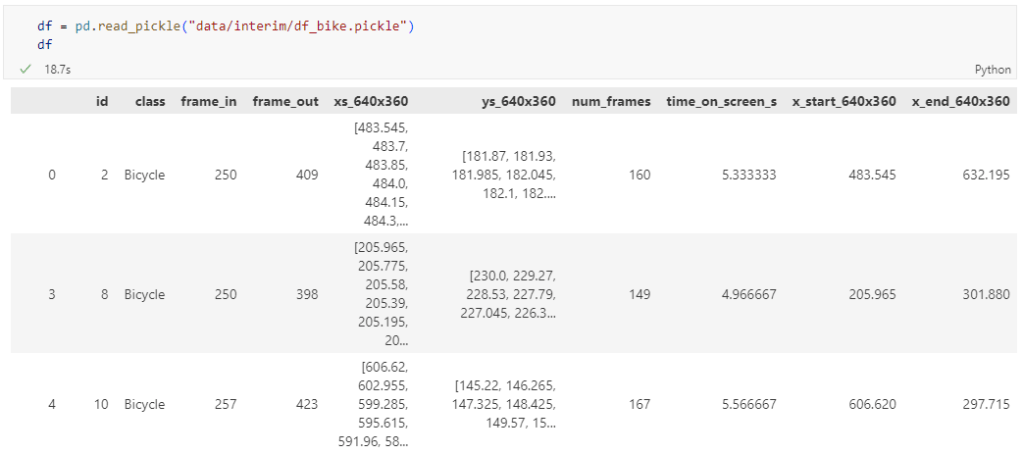
The bicycle trajectory coordinates are stored in two separate lists: xs_640x360 and ys640x360:

This format is kind of similar to the Kaggle Taxi dataset, we worked with in the previous post. However, to use the solution we implemented there, we need to combine the x and y coordinates into nice (x,y) tuples:

df['coordinates'] = df.apply(
    lambda row: list(zip(row['xs_640x360'], row['ys_640x360'])), axis=1)
df.drop(columns=['xs_640x360', 'ys_640x360'], inplace=True)

Afterwards, we can create the points and compute the proper timestamps from the frame numbers:

def compute_datetime(row):
    # some educated guessing going on here: the paper states that the video covers 2021-06-09 07:00-08:00
    d = datetime(2021,6,9,7,0,0) + (row['frame_in'] + row['running_number']) * timedelta(seconds=2)
    return d
def create_point(xy):
    try: 
        return Point(xy)
    except TypeError:  # when there are nan values in the input data
        return None
new_df = df.head().explode('coordinates')
new_df['geometry'] = new_df['coordinates'].apply(create_point)
new_df['running_number'] = new_df.groupby('id').cumcount()
new_df['datetime'] = new_df.apply(compute_datetime, axis=1)
new_df.drop(columns=['coordinates', 'frame_in', 'running_number'], inplace=True)
new_df

Once the points and timestamps are ready, we can create the MovingPandas TrajectoryCollection. Note how we explicitly state that there is no CRS for this dataset (crs=None):

trajs = mpd.TrajectoryCollection(
    gpd.GeoDataFrame(new_df), 
    traj_id_col='id',  t='datetime', crs=None)

Plotting trajectories with image coordinates

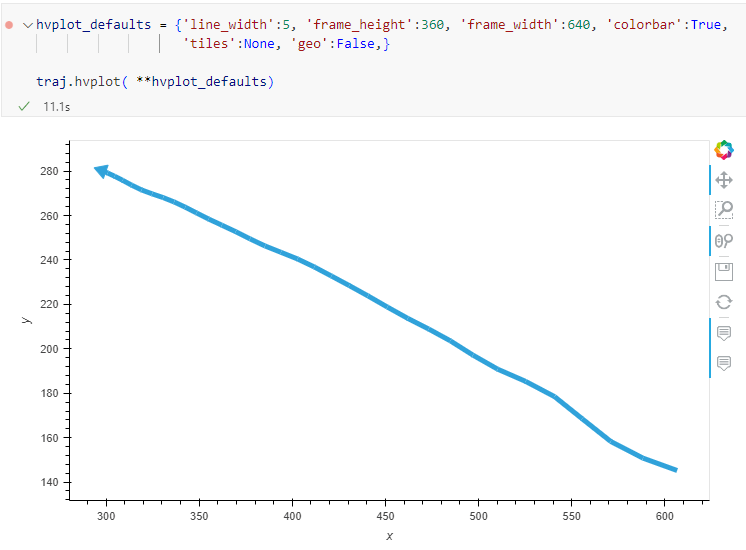
Similarly, to plot these trajectories, we should tell hvplot that it should not fetch any background map tiles (’tiles’:None) and that the coordinates are not geographic (‘geo’:False):

If you want to explore the full source code, you can find my Github fork with the Jupyter notebook at: https://github.com/anitagraser/desirelines/blob/main/mpd.ipynb

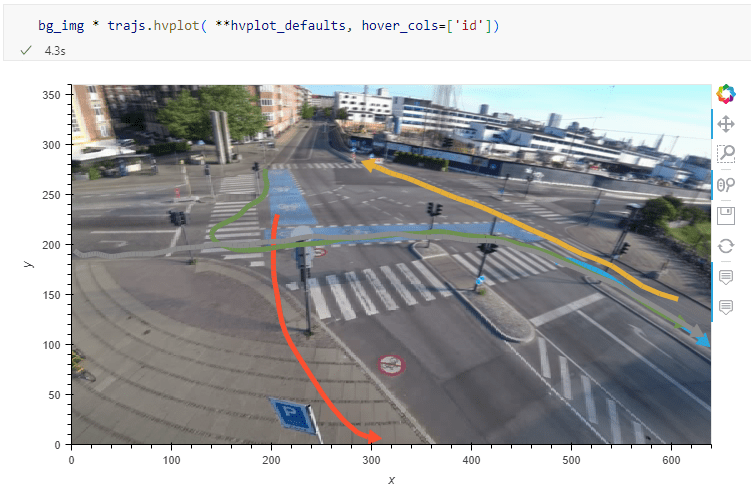
The repository also contains a camera image of the intersection, which we can use as a background for our trajectory plots:

bg_img = hv.RGB.load_image('img/intersection2.png', bounds=(0,0,640,360)) 

One important caveat is that speed will be calculated in pixels per second. So when we plot the bicycle speed, the segments closer to the camera will appear faster than the segments in the background:

To fix this issue, we would have to correct for the distortions of the camera lens and perspective. I’m sure that there is specialized software for this task but, for the purpose of this post, I’m going to grab the opportunity to finally test out the VectorBender plugin.

Georeferencing the trajectories using QGIS VectorBender plugin

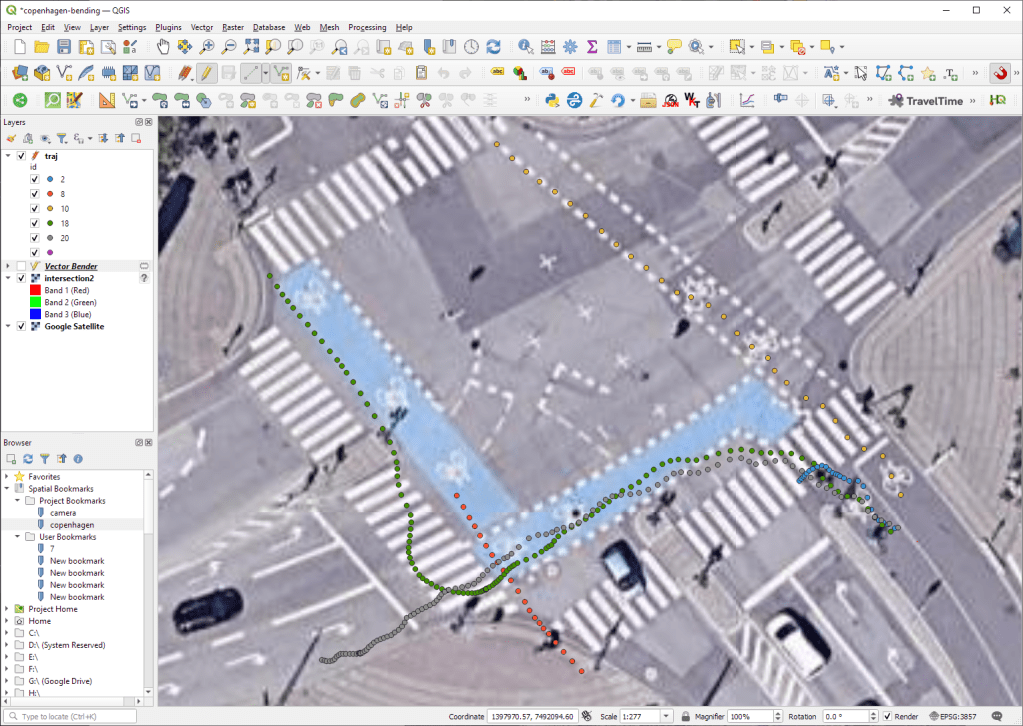
Let’s load the five test trajectories and the camera image to QGIS. To make sure that they align properly, both are set to the same CRS and I’ve created the following basic world file for the camera image:

1
0
0
-1
0
360

Then we can use the VectorBender tools to georeference the trajectories by linking locations from the camera image to locations on aerial images. You can see the whole process in action here:

After around 15 minutes linking control points, VectorBender comes up with the following georeferenced trajectory result:

Not bad for a quick-and-dirty hack. Some points on the borders of the image could not be georeferenced since I wasn’t always able to identify suitable control points at the camera image borders. So it won’t be perfect but should improve speed estimates.


This post is part of a series. Read more about movement data in GIS.

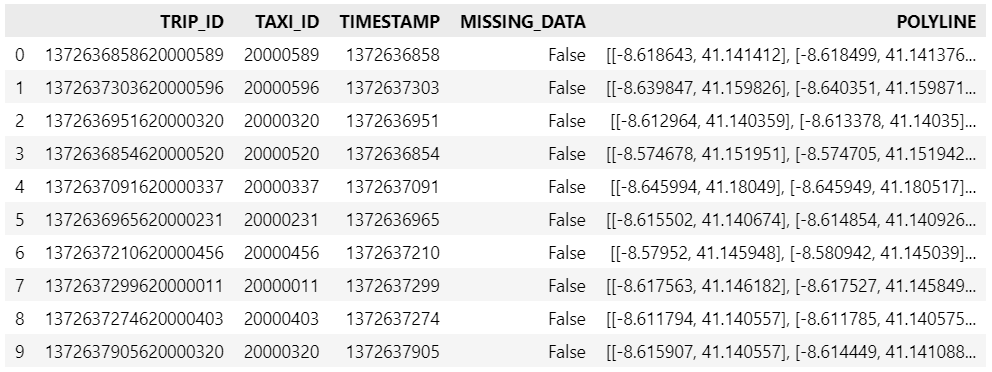
Kaggle’s “Taxi Trajectory Data from ECML/PKDD 15: Taxi Trip Time Prediction (II) Competition” is one of the most used mobility / vehicle trajectory datasets in computer science. However, in contrast to other similar datasets, Kaggle’s taxi trajectories are provided in a format that is not readily usable in MovingPandas since the spatiotemporal information is provided as:

  • TIMESTAMP: (integer) Unix Timestamp (in seconds). It identifies the trip’s start;
  • POLYLINE: (String): It contains a list of GPS coordinates (i.e. WGS84 format) mapped as a string. The beginning and the end of the string are identified with brackets (i.e. [ and ], respectively). Each pair of coordinates is also identified by the same brackets as [LONGITUDE, LATITUDE]. This list contains one pair of coordinates for each 15 seconds of trip. The last list item corresponds to the trip’s destination while the first one represents its start;

Therefore, we need to create a DataFrame with one point + timestamp per row before we can use MovingPandas to create Trajectories and analyze them.

But first things first. Let’s download the dataset:

import datetime
import pandas as pd
import geopandas as gpd
import movingpandas as mpd
import opendatasets as od
from os.path import exists
from shapely.geometry import Point

input_file_path = 'taxi-trajectory/train.csv'

def get_porto_taxi_from_kaggle():
    if not exists(input_file_path):
        od.download("https://www.kaggle.com/datasets/crailtap/taxi-trajectory")

get_porto_taxi_from_kaggle()
df = pd.read_csv(input_file_path, nrows=10, usecols=['TRIP_ID', 'TAXI_ID', 'TIMESTAMP', 'MISSING_DATA', 'POLYLINE'])
df.POLYLINE = df.POLYLINE.apply(eval)  # string to list
df

And now for the remodelling:

def unixtime_to_datetime(unix_time):
    return datetime.datetime.fromtimestamp(unix_time)

def compute_datetime(row):
    unix_time = row['TIMESTAMP']
    offset = row['running_number'] * datetime.timedelta(seconds=15)
    return unixtime_to_datetime(unix_time) + offset

def create_point(xy):
    try: 
        return Point(xy)
    except TypeError:  # when there are nan values in the input data
        return None
 
new_df = df.explode('POLYLINE')
new_df['geometry'] = new_df['POLYLINE'].apply(create_point)
new_df['running_number'] = new_df.groupby('TRIP_ID').cumcount()
new_df['datetime'] = new_df.apply(compute_datetime, axis=1)
new_df.drop(columns=['POLYLINE', 'TIMESTAMP', 'running_number'], inplace=True)
new_df

And that’s it. Now we can create the trajectories:

trajs = mpd.TrajectoryCollection(
    gpd.GeoDataFrame(new_df, crs=4326), 
    traj_id_col='TRIP_ID', obj_id_col='TAXI_ID', t='datetime')
trajs.hvplot(title='Kaggle Taxi Trajectory Data', tiles='CartoLight')

That’s it. Now our MovingPandas.TrajectoryCollection is ready for further analysis.

By the way, the plot above illustrates a new feature in the recent MovingPandas 0.16 release which, among other features, introduced plots with arrow markers that show the movement direction. Other new features include a completely new custom distance, speed, and acceleration unit support. This means that, for example, instead of always getting speed in meters per second, you can now specify your desired output units, including km/h, mph, or nm/h (knots).


This post is part of a series. Read more about movement data in GIS.

I’ve previously written about Movement data in GIS and the AI hype and today’s post is a follow-up in which I want to share with you a new review of the state of the art in deep learning from trajectory data.

Our review covers 8 use cases:

  1. Location classification
  2. Arrival time prediction
  3. Traffic flow / activity prediction
  4. Trajectory prediction
  5. Trajectory classification
  6. Next location prediction
  7. Anomaly detection
  8. Synthetic data generation

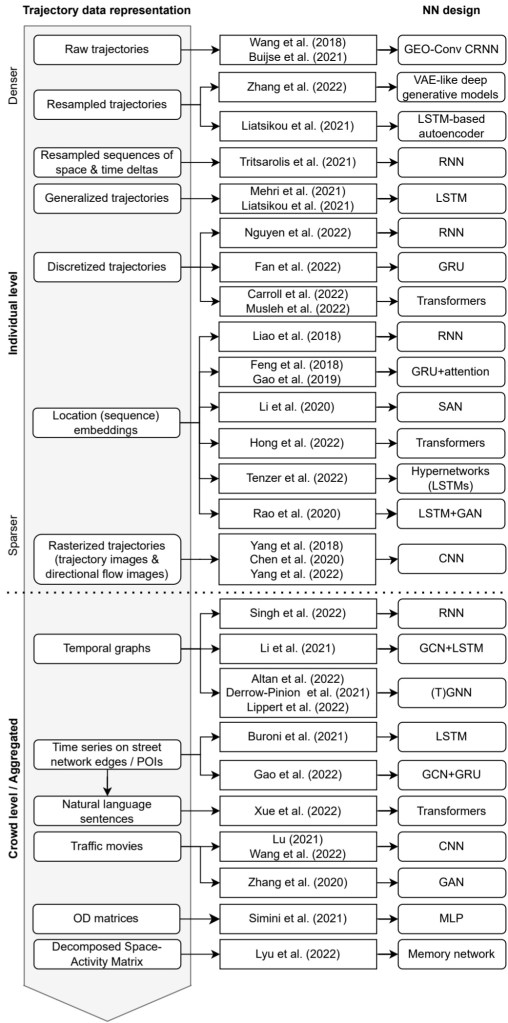
We particularly looked into the trajectory data preprocessing steps and the specific movement data representation used as input to train the neutral networks:

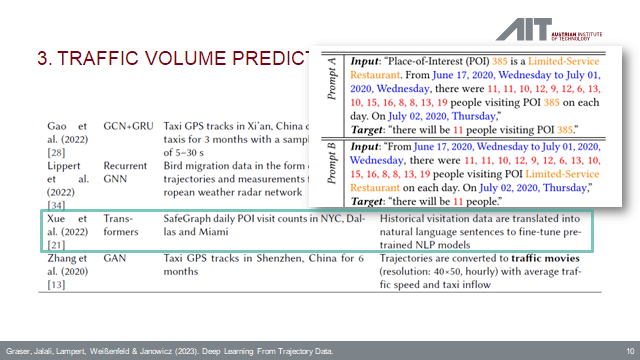
On a completely subjective note: the price for most surprising approach goes to natural language processing (NLP) Transfomers for traffic volume prediction.

The paper was presented at BMDA2023 and you can watch the full talk recording here:

References

Graser, A., Jalali, A., Lampert, J., Weißenfeld, A., & Janowicz, K. (2023). Deep Learning From Trajectory Data: a Review of Neural Networks and the Trajectory Data Representations to Train Them. Workshop on Big Mobility Data Analysis BMDA2023 in conjunction with EDBT/ICDT 2023.


This post is part of a series. Read more about movement data in GIS.

Today’s post is a geeky deep dive into how to leverage DVC (not just) data version control to track QGIS geoprocessing workflows.

“Why is this great?” you may ask.

DVC tracks data, parameters, and code. If anything changes, we simply rerun the process and DVC will figure out which stages need to be recomputed and which can be skipped by re-using cached results.

This can lead to huge time savings compared to re-running the whole model

You can find the source code used in this post on my repo https://github.com/anitagraser/QGIS-resources/tree/dvc

I’m using DVC with the DVC plugin for VSCode but DVC can be used completely from the command line, if you prefer this appraoch.

Basically, what follows is a proof of concept: converting a QGIS Processing model to a DVC workflow. In the following screenshot, you can see the main stages

  1. The QGIS model in the upper left corner
  2. The Python script exported from the QGIS model builder in the lower left corner
  3. The DVC stages in my dvc.yaml file in the upper right corner (And please ignore the hello world stage. It’s a left over from my first experiment)
  4. The DVC DAG visualizing the sequence of stages. Looks similar to the QGIS model, doesn’t it ;-)

Besides the stage definitions in dvc.yaml, there’s a parameters file:

random-points:
  n: 10
buffer-points:
  size: 0.5

And, of course, the two stages, each as it’s own Python script.

First, random-points.py which reads the random-points.n parameter to create the desired number of points within the polygon defined in qgis3/data/test.geojson:

import dvc.api

from qgis.core import QgsVectorLayer
from processing.core.Processing import Processing
import processing

Processing.initialize()

params = dvc.api.params_show()
pts_n = params['random-points']['n']

input_vector = QgsVectorLayer("qgis3/data/test.geojson")
output_filename = "qgis3/output/random-points.geojson"

alg_params = {
    'INCLUDE_POLYGON_ATTRIBUTES': True,
    'INPUT': input_vector,
    'MAX_TRIES_PER_POINT': 10,
    'MIN_DISTANCE': 0,
    'MIN_DISTANCE_GLOBAL': 0,
    'POINTS_NUMBER': pts_n,
    'SEED': None,
    'OUTPUT': output_filename
}
processing.run('native:randompointsinpolygons', alg_params)

And second, buffer-points.py which reads the buffer-points.size parameter to buffer the previously generated points:

import dvc.api
import geopandas as gpd
import matplotlib.pyplot as plt

from qgis.core import QgsVectorLayer
from processing.core.Processing import Processing
import processing

Processing.initialize()

params = dvc.api.params_show()
buffer_size = params['buffer-points']['size']

input_vector = QgsVectorLayer("qgis3/output/random-points.geojson")
output_filename = "qgis3/output/buffered-points.geojson"

alg_params = {
    'DISSOLVE': False,
    'DISTANCE': buffer_size,
    'END_CAP_STYLE': 0,  # Round
    'INPUT': input_vector,
    'JOIN_STYLE': 0,  # Round
    'MITER_LIMIT': 2,
    'SEGMENTS': 5,
    'OUTPUT': output_filename
}
processing.run('native:buffer', alg_params)

gdf = gpd.read_file(output_filename)
gdf.plot()

plt.savefig('qgis3/output/buffered-points.png')

With these things in place, we can use dvc to run the workflow, either from within VSCode or from the command line. Here, you can see the workflow (and how dvc skips stages and fetches results from cache) in action:

If you try it out yourself, let me know what you think.

The QGIS conda packages have been around for a while. One of their use cases, for example, is to allow Linux users to easily install multiple versions of QGIS.

Similarly, we’ve seen posts on using PyQGIS in Jupyter notebooks. However, I find the setup with *.bat files rather tricky.

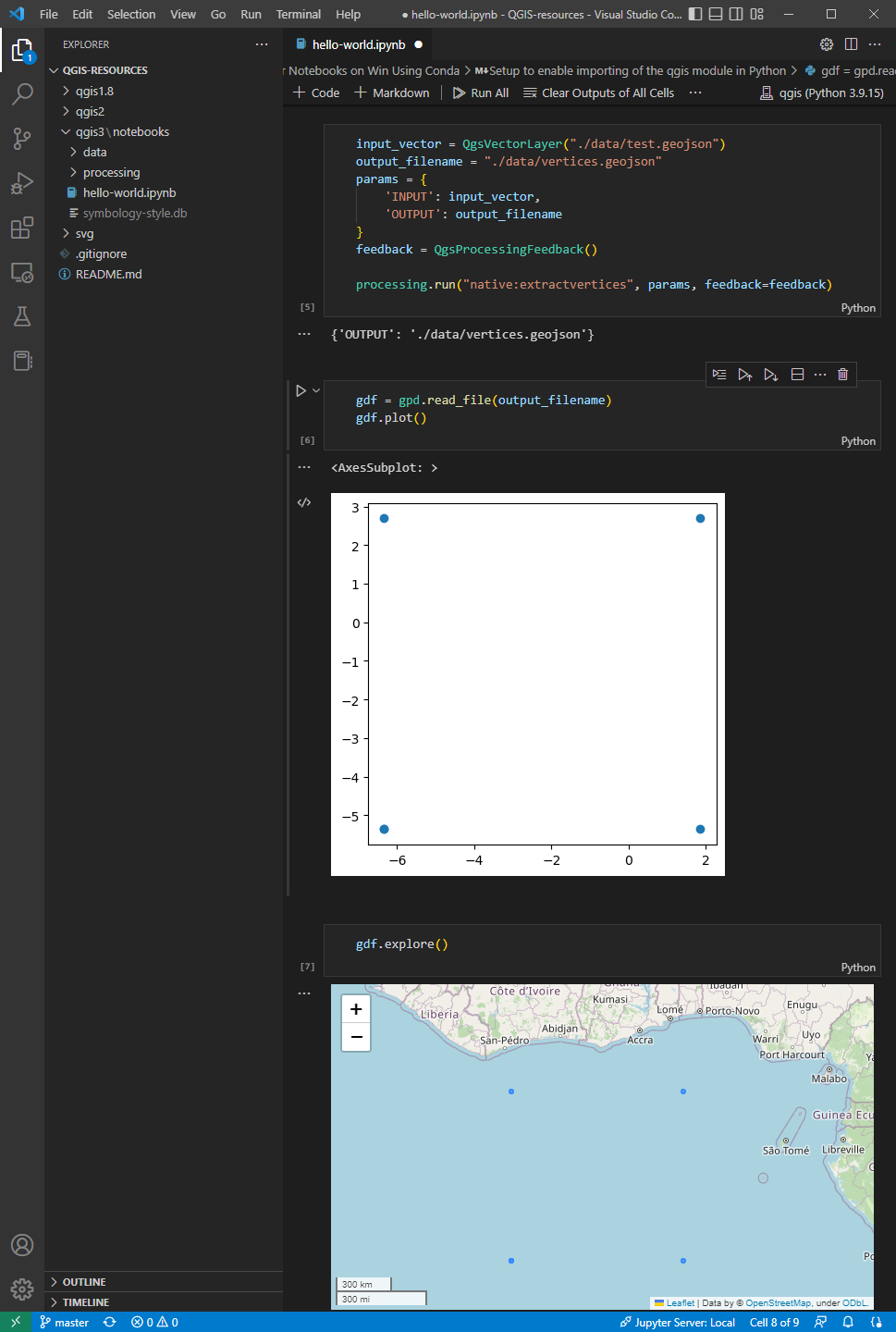
This post presents a way to set up a conda environment with QGIS that is ready to be used in Jupyter notebooks.

The first steps are to create a new environment and install QGIS. I use mamba for the installation step because it is faster than conda but you can use conda as well:

(base) PS C:\Users\anita> conda create -n qgis python=3.9
(base) PS C:\Users\anita> conda activate qgis
(qgis) PS C:\Users\anita> mamba install -c conda-forge qgis=3.28.2 
(qgis) PS C:\Users\anita> qgis

If we now try to import the qgis module in Python, we get an error:

(qgis) PS C:\Users\anita> python
Python 3.9.15 | packaged by conda-forge | (main, Nov 22 2022, 08:41:22) [MSC v.1929 64 bit (AMD64)] on win32
Type "help", "copyright", "credits" or "license" for more information.
>>> import qgis
Traceback (most recent call last):
  File "<stdin>", line 1, in <module>
ModuleNotFoundError: No module named 'qgis'

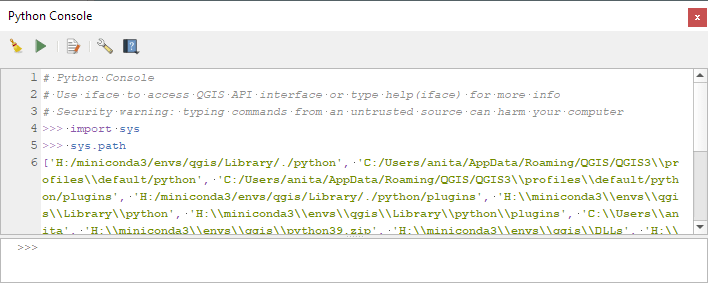
To fix this error, we need to get the paths from the Python console inside QGIS:

import sys
sys.path
['H:/miniconda3/envs/qgis/Library/./python', 'C:/Users/anita/AppData/Roaming/QGIS/QGIS3\\profiles\\default/python', ... ]

This list of paths can be configured as the defaults for our qgis environment using conda develop:

(qgis) PS C:\Users\anita> conda activate base
(base) PS C:\Users\anita> mamba install conda-build -c conda-forge
(base) PS C:\Users\anita> conda develop -n qgis [list of paths from qgis python console] 

With this setup, the import should now work without errors:

(base) PS C:\Users\anita> conda activate qgis
(qgis) PS C:\Users\anita> python
Python 3.9.15 | packaged by conda-forge | (main, Nov 22 2022, 08:41:22) [MSC v.1929 64 bit (AMD64)] on win32
Type "help", "copyright", "credits" or "license" for more information.
>>> import qgis

The example Jupyter notebook covers running a QGIS Processing algorithm and visualizing the results in the notebook using GeoPandas:

Head over to Github to find the full instructions: https://github.com/anitagraser/QGIS-resources/blob/master/qgis3/notebooks/hello-world.ipynb

December has been busy with two new MovingPandas releases: v0.13 and v0.14.

The latest v0.14 release is now available from conda-forge.

These releases are a huge step forward towards making MovingPandas easier to install with fewer mandatory dependencies. All interactive plotting libraries are now optional. So if you are using MovingPandas for trajectory data processing in the background and don’t need the interactive visualization features, the number of necessary libraries is now much lower. This (and the fact that GeoPandas is now shipped with OSGeo4W) will also make it easier to use MovingPandas in QGIS plugins.

New features:

  • #268 New add_angular_difference method

Includes fixes and enhancements for:

  • #267 Improved documentation: direction values are [0, 360)

Behind the scenes:

As always, all tutorials are available from the movingpandas-examples repository and on MyBinder:

If you have questions about using MovingPandas or just want to discuss new ideas, you’re welcome to join our discussion forum.