The evolution of QGIS since July 2002:

QGIS Release Timeline
The evolution of QGIS since July 2002:
QGIS Release Timeline
A cartogram is a map where some variable (e.g. population) is substituted for land area or distance. The geometry of the map is distorted to convey the information of this variable.
“Cartogram Creator” is a Python plugin for QGIS available through Carson Farmer’s repository.

Cartogram Creator icon
To use this plugin, you need a polygon layer with the attribute you want to be represented in the cartogram. I’m using a small file of Austrian regions with population data:
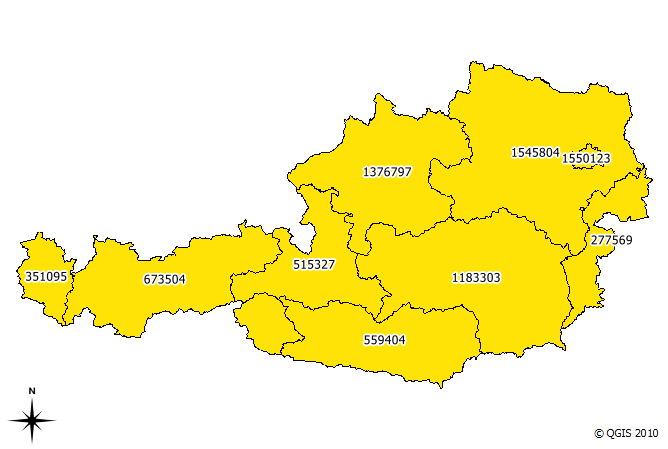
base data (Austrian regions and number of inhabitants)
The small island in the north-east is Vienna, the Austrian capital. With more than 1.5 million inhabitants, it is the region with highest population. This fact should be visible in the resulting cartogram.
I chose to run five iterations of the plugin algorithm. The plugin allows saving of each iteration’s result. This is how the shape of the region changes through the iterations:
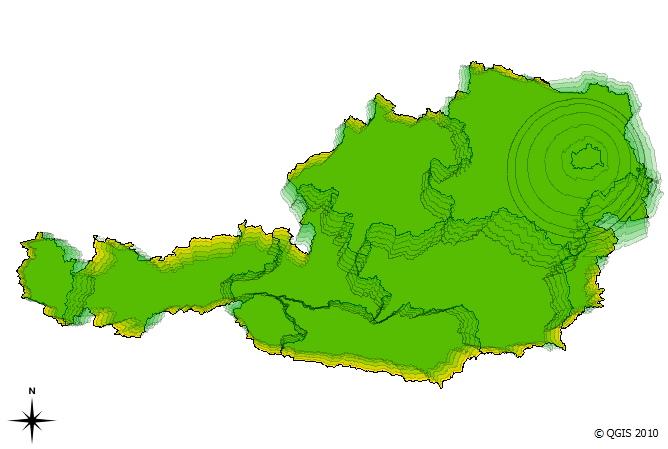
cartogram iterations (n=5)
We can see Vienna “growing”. The final result looks like this:
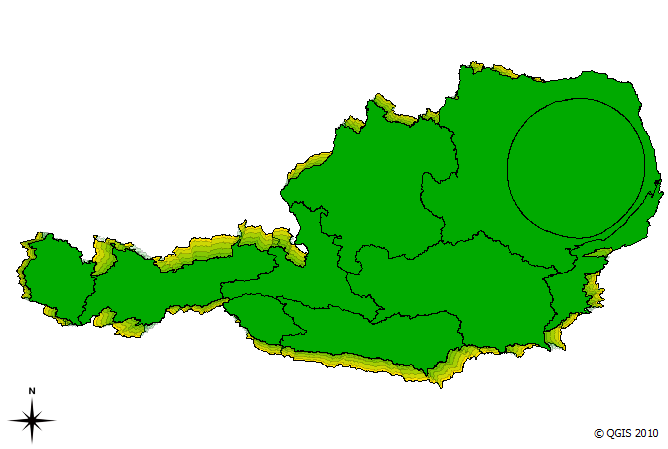
cartogram result after five interations
The cartogram shows pretty clearly that the Vienna region is home to a considerable population.
MMQGIS is a set of Python plugins for manipulating vector map layers in Quantum GIS. […] MMQGIS does offer some useful tools missing from native QGIS or common plugin sets …
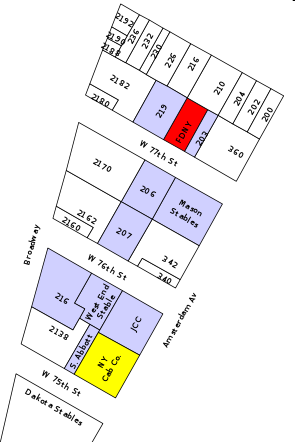
Labels Layer example
MMQGIS currently contains the following tools:
The project homepage is located at michaelminn.com.
The following code snippet contains the constructor of a GUI control class for QGIS plugins. It’s job is to initialize the plugin GUI (a dock widget in this case) and create signal connections:
import os
from PyQt4.QtCore import *
from PyQt4.QtGui import *
from PyQt4 import uic
from qgis.core import *

class MyGuiControl(QObject):
    """This class controls all plugin-related GUI elements."""

    def __init__ (self,iface):
        """initialize the GUI control"""
        QObject.__init__(self)
        self.iface = iface

        # load the form
        path = os.path.dirname( os.path.abspath( __file__ ) )
        self.dock = uic.loadUi( os.path.join( path, "mywidget.ui" ) )
        self.iface.addDockWidget( Qt.RightDockWidgetArea, self.dock )

        # connect to gui signals
        QObject.connect(self.dock...
        ...
Using uic.loadUi is a convenient way to create a user interface with minimum effort. Of course the performance might be better if we compile the .ui code to python first, but during development phase this saves us an extra step.
For some plugins it’s necessary to save the settings inside the QGIS project file. Saving is done with this simple one-liner:
QgsProject.instance().writeEntry(pluginName, setting, value)
Then you just need to save the project.
Reading is performed with one of the following functions:
QgsProject.instance().readEntry (pluginName, setting) # for strings
QgsProject.instance().readNumEntry (pluginName, setting)
QgsProject.instance().readDoubleEntry (pluginName, setting)
QgsProject.instance().readBoolEntry (pluginName, setting)
QgsProject.instance().readListEntry (pluginName, setting)
You’ll find the corresponding API documentation at: http://doc.qgis.org/stable/classQgsProject.html. As you can see, you can only read/write simple data types. To allow the plugin developer to save more complex plugin settings, I filed an enhancement request.
To handle all those different read functions in a convenient way, I created the following functions:
def readSetting(self,func,setting):
    """read a plugin setting from QgsProject instance"""
    value,ok = func('pluginName',setting)
    if ok:
        return value
    else:
        return None

def readSettings(self,setting,value):
    """read plugin settings from QgsProject instance"""
    # map data types to function names
    prj = QgsProject.instance()
    functions = { 'str' : prj.readEntry,
                  'int' : prj.readNumEntry,
                  'float' : prj.readDoubleEntry,
                  'bool' : prj.readBoolEntry,
                  'pyqtWrapperType' : prj.readListEntry # QStringList
                }

    dataType = type(value).__name__
    return = self.readSetting(functions[dataType],setting)
readSettings() has to be supplied with the name of the setting and an example or default value for the setting (from which we can determine the data type of the setting). Of course this can be done in many different ways. In Time Manager plugin, readSettings() receives a dictionary of all settings that have to be read. The function then loops through the dictionary and reads the available settings.
Adding a unique ID to an (editable) layer in QGIS is easy:

QGIS Field Calculator Operators incl. "rownum"
Sometimes, we just want to visualize the contents of a PostGIS table containing some x/y data but no actual geometries in QGIS. But there the problems arise: We don’t have the right to add a geometry column, the table doesn’t have a suitable ID or OIDs (QGIS demands a unique integer ID) and we can’t or don’t want to mess with the database anyway. Loading the table with “Add PostGIS Layer” will result in a non-spatial layer (or fail if you use an older QGIS versions).
RT Sql Layer Plugin to the rescue!
I presented this plugin in a previous post. It allows you to execute any SQL SELECT statement, even really complex ones. Luckily, this time we don’t need anything fancy, only the two functions row_number() and makepoint():
select
  row_number() over (order by col1)::int AS my_id,
  col1,
  col2,
  x, y,
  makepoint(x,y) as the_geom
from my_table
Have you ever wondered how to comfortable visualize PostGIS queries? Meet “RT Sql Layer” a powerful and comfortable QGIS plugin that allows building and visualizing queries on your PostGIS data.
RT Sql Layer comes with a graphic query builder:

RT Sql Layer Query Builder dialog
It allows saving/loading of queries to speed up your work flow.
The query results will be loaded as a new layer:

Loaded query layer
RT Sql Layer is available through Faunalia Plugin Repository.
For another great example on what can be achieved with this plugin, read Carson Farmer’s post on “pgRouting, OpenStreetMap, and QGIS” where he describes how to build your own routing database and visualize routing results in QGIS with RT Sql Layer.
More on RT Sql Layer: How to create Point Layers from x/y Data on the fly with PostGIS and QGIS
For a while now, QGIS releases have been named after moons. This will change with the next release 1.6:
All releases from 1.6 forward will be named after a place on earth, preferably a very obscure place with an interesting story behind it.
You can submit your name suggestions on the QGIS Wiki page.
Carson Farmer has written some new classification functions for QGIS. QGIS 1.5 only has “Equal Interval” and “Quantiles” classification algorithms implemented. Carson added the following algorithms to trunk:
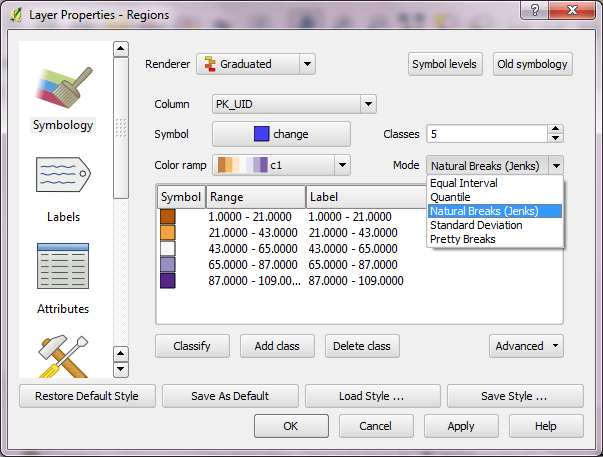
QGIS classification algorithms for layer symbology in current QGIS trunk version
Read more on his blog: “Playing around with classification algorithms: Python and QGIS” and “Adding a bit of class(ification) to QGIS…”
 Free and Open Source GIS Ramblings