Nathan has created an amazing video about 8 years of QGIS development using Gource. Each cluster of files is a directory and the branches show the folder hierarchy:


To find out how he did it, read “Generating a Gource source commit history visualization for QGIS (Quantum GIS)”

The Victorian Department of Sustainability and Environment (DSE) is undertaking a larger trial of QGIS. 38 GIS products were assessed by consulter Spatial Vision. In the end, two Open Source GIS products, gvSIG and QGIS, were presented to DSE stakeholders. Overall, QGIS was rated highest in functionality and usability. — read more

In spring 2011, the Quantum GIS project will hold a QGIS Developer Meeting, aka ‘QGIS Hackfest’ in Lisbon, Portugal. Proposed dates  are (both Thursday to Monday):

  • (14)-15-16-17-(18) April 2011, OR
  • (28)-29-30-01-(02) April/May 2011

OpenTripPlanner is an open source multi-modal trip planner released under LGPL. The software is at version 0.3 and currently implements:

  • Plans true multi-modal trips combining walking, biking and transit
  • Plans wheelchair accessible trips
  • Plans depart by/arrive by trips
  • Takes road type, bike lane, and elevation data into account when planning bike trips
  • Show elevation maps for bike trips
  • Imports data from GTFS, shapefiles, OpenStreetMap, and the National Elevation Dataset
  • Plans trips in about 100ms in a moderate sized city
  • Exposes a RESTful API (XML and JSON), which other apps or front-ends can build on

Give it a try at opentripplanner.com.

Today, I have been exploring toolkits for web graphs and visualization. One impressive implementation is called Protovis (it is free and open-source, under BSD License). It uses JavaScript and SVG for visualizations.

Best thing: Protovis is spatial too!

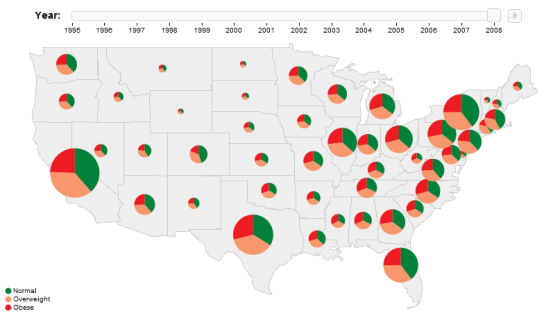
Protovis offers two ways of visualizing spatial data: either on top of existing map tools like OpenLayers, or using their own geo scales. One of their examples is this map with pie charts and a time slider:

Protovis pie chart example

Works and looks great!

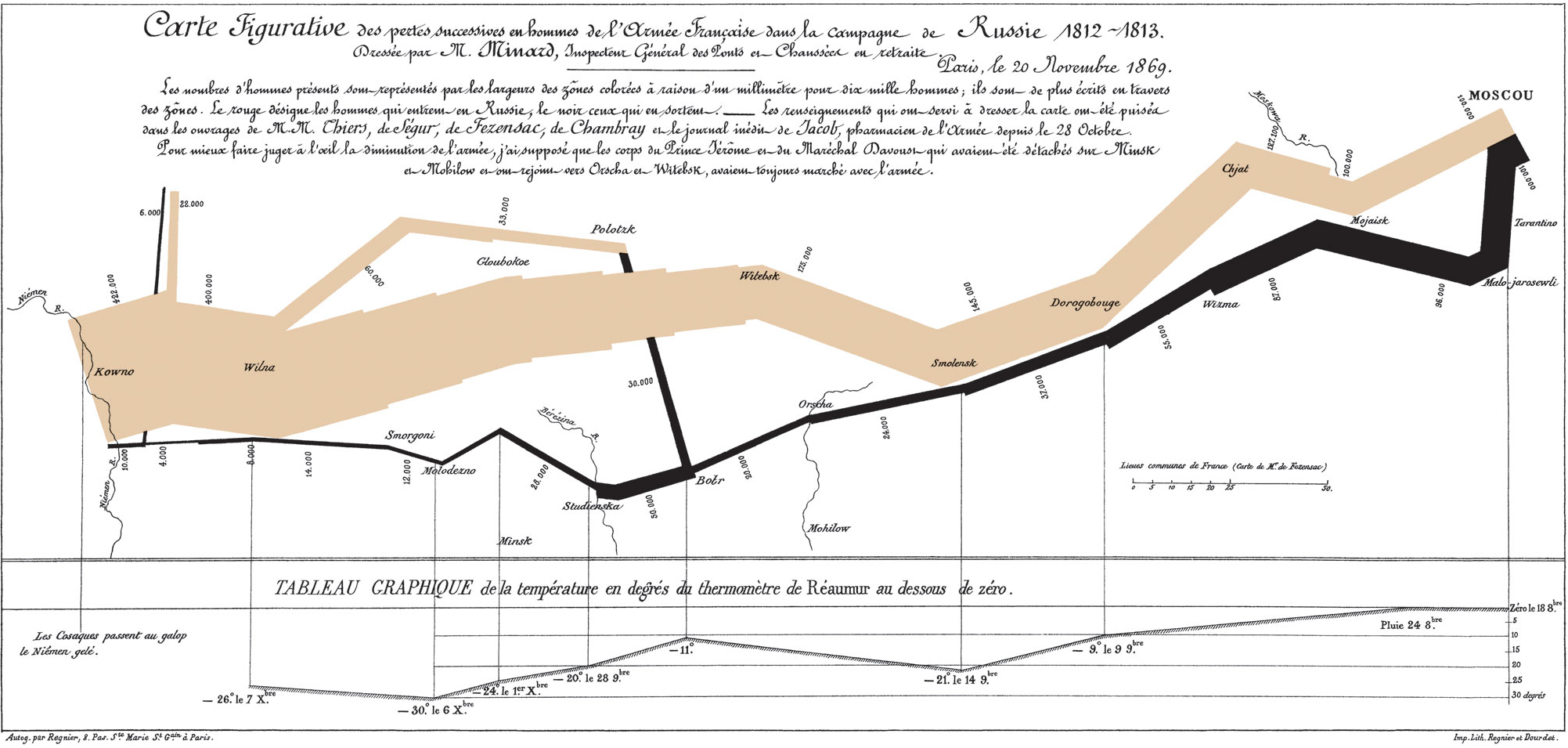
They also offer a tool inspired by Charles Minard’s depiction of Napleon’s disastrous march to Moscow:

Minard's famous map

Definitely worth a closer look!

This post describes how to calculate raster profile information (altitude changes to be exact) for a road vector layer from a DEM. DEM source is NASA’s free SRTM data.

The following script is based on scw’s answer to my related question on gis.stackexchange. This script is supposed to be run from inside a GRASS console (as I haven’t figured out yet how to import grass into python otherwise).

The idea behind this is to create points along the input road vectors and then sample the DEM values at those points. The resulting 3D points are then evaluated in a python function and the results inserted back into GRASS. There, the new values (altitude changes up and down hill) are joined back to the road elements.

import grass.script as grass
from pysqlite2 import dbapi2 as sqlite
from datetime import datetime

class AltitudeCalculator():
    def __init__(this, point_file):
        this.file = open(point_file,'r')
        this.prev_elevation = None
        this.prev_id = None
        this.increase = 0
        this.decrease = 0
        this.id = None
        this.output = ''
    
    def calculate(this):
        for line in this.file:
            line = line.split('|')
        
            #x = float(line[0])
            #y = float(line[1])
            elev = float(line[2]) 
            this.id = int(line[3])
        
            if this.prev_id:
                if this.prev_id == this.id:
                    # continue this road id
                    change = elev - this.prev_elevation 
                    if change > 0:
                        this.increase += change
                    else:
                        this.decrease += change   
                else:
                    # end of road id, save current data and reset
                    this.addOutputLine()
                    this.reset()
                    
            this.prev_id = this.id
            this.prev_elevation = elev
        
        this.addOutputLine() # last entry  

    def reset(this):
        this.increase = 0
        this.decrease = 0 
        
    def addOutputLine(this):
        this.output += "%i,%i,%i\n" % (this.prev_id, int(round(this.increase)), int(round(this.decrease)))
        
    def save(this, file_name):
        # create .csv file
        file = open(file_name,'w')
        file.write('road_id,sum_up,sum_down\n'+this.output) 
        file.close()
        # create .csvt file describing the columns
        file = open(file_name+'t','w')
        file.write('"Integer","Integer","Integer"')
        file.close()
        
def main():
    road_file = '/home/user/maps/roads.shp'
    elevation_file = '/home/user/maps/N48E016.hgt'
    point_file = '/home/user/maps/osm_road_pts_3d.txt'
    alt_diff_file = '/home/user/maps/alt_diff.csv'
    db_file = '/home/user/grass/newLocation/test/sqlite.db'
    
    print('db.connect: '+str(datetime.now()))
    grass.run_command("db.connect", driver='sqlite', database=db_file)
    
    # import files    
    print('import files: '+str(datetime.now()))
    grass.run_command("r.in.gdal", input=elevation_file, output='srtm_dem', overwrite=True)
    grass.run_command("v.in.ogr", dsn=road_file, output='osm_roads', min_area=0.0001, snap=-1, overwrite=True)
    
    # set resolution to match DEM
    print('set resolution to match DEM: '+str(datetime.now()))
    grass.run_command("g.region", rast='srtm_dem')

    # convert to points
    print('convert to points: '+str(datetime.now()))
    grass.run_command("v.to.points",  input='osm_roads', output='osm_road_pts', type='line', dmax=0.001, overwrite=True, flags='ivt')
    
    # extract elevation at each point
    print('extract elevation at each point: '+str(datetime.now()))
    grass.run_command("v.drape", input='osm_road_pts', output='osm_road_pts_3d', type='point', rast='srtm_dem', method='cubic', overwrite=True)
    
    # export to text files
    print('export to text files: '+str(datetime.now()))
    grass.run_command("v.out.ascii", input='osm_road_pts_3d', output=point_file, overwrite=True)
    
    # calculate height differences
    print('calculate height differences: '+str(datetime.now()))
    calculator = AltitudeCalculator(point_file)
    calculator.calculate()
    calculator.save(alt_diff_file)
    
    # import height differences into grass
    print('import height differeces into grass: '+str(datetime.now()))
    grass.run_command("db.droptable", table='alt_diff', flags='f')
    grass.run_command("db.in.ogr", dsn=alt_diff_file, output='alt_diff')
    
    # create an index
    print('create an index: '+str(datetime.now()))
    connection = sqlite.connect(db_file) 
    cursor = connection.cursor()
    sql = 'create unique index alt_diff_road_id on alt_diff (road_id)'
    cursor.execute(sql)
    connection.close()
    
    # join
    print('join: '+str(datetime.now()))
    grass.run_command("v.db.join", map='osm_roads', layer=1, column='cat', otable='alt_diff', ocolumn='road_id')
    
    print('Done: '+str(datetime.now()))

if __name__ == "__main__":
    main()
Regular magnifying lens tools come with a disadvantage: They cause discontinuities in the map, they break roads and borders and cover up some underlying areas:

Ordinary magnifying lense effect

Smooth magnifying lens tools solve this problem. The idea is not new:

Conrad Morant (1548)

… but it’s not implemented in any of the widely used toolboxes. In fact, I’m not aware of any implementation up-to-date.

[Harrie, L., Sarjakoski, T., Lehto, L. A variable-scale map for small-display cartography. In: Joint International Symposium on GeoSpatial Theory, Processing and Applications (ISPRS/Commission IV, SDH2002). Ottawa, Canada, July 2002] present an algorithm for a smooth magnifying lens effect.

As barrycarter pointed out on gis. stackexchange,  this visualization can be seen as a kind of cartogram and could probably be implemented in a similar fashion. I’d love to see such a tool in QGIS and probably even OpenLayers.

10 December 2010 – The Open Geospatial Consortium (OGC®) announces adoption and availability of the OGC Georeferenced Table Joining Service (TJS) Implementation Standard, Version 1.0. The TJS standard is available for free download at http://www.opengeospatial.org/standards/tjs.

The OGC TJS standard defines an interface for services that provide the ability to join attribute data stored in one database on a network with corresponding geometry (points, lines, or polygons) stored in another network accessible database.

… more

New symbology has been around for quite a while now, but the last weeks have seen some great new additions to this functionality. Let’s have a look at what can be achieved:

Arrow styles

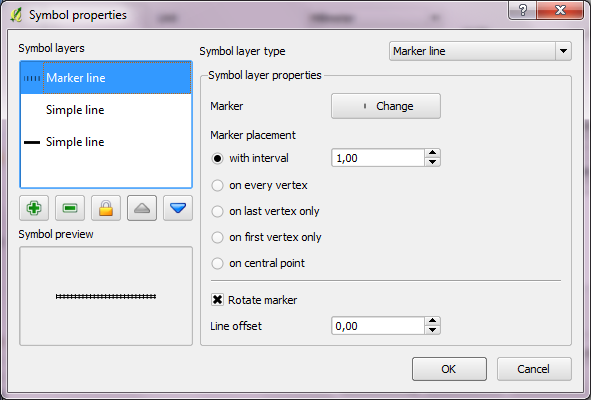
Using ‘Marker Placement’ options in ‘Marker Line’,  we can now create fancy arrows pointing in or against line direction.

Arrow style for line layers using 'Marker Lines' and specialized marker placement

Rails style

Using ‘Marker Line’, we can also create nice looking railway styles. The ‘sleepers’ are created using vertical line markers at certain intervals.

Rail style with 'Marker Line' at certain interval

Polygon styles

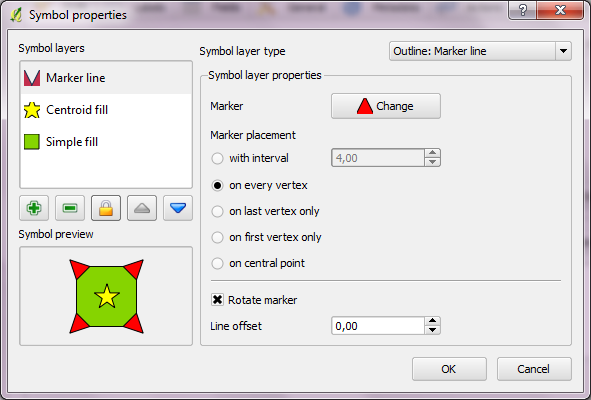
Besides normal  and SVG polygon fill styles, new symbology now offers centroid and outline styles. Outline styles offer all options found in line style dialog (simple, marker and line decoration).

Fun polygon style using fill, outline and centroid layer

QGIS community has developed some interesting new features over the last weeks:

  • Nathan Woodrow has created a graphical rule builder for rule based vector symbology. Rule based symbologies allow you to create classes of features based on custom rules. Now, you don’t need to write those rules manually anymore.
  • Martin Dobias has implemented functionality that allows you to treat the outline of polygons as a separate entity. This way, you can render a polygon with one or more line styles. Additionally, you can render a marker on the polygon centroid.

The time of old symbology is running out. It will not be available for QGIS 2.0 anymore, but who will miss it? The development speed of QGIS symbology in the last months has been simply astonishing!