Adding a unique ID to an (editable) layer in QGIS is easy:
- Turn editing on and
- go to field calculator, there you can
- add a new column and
- populate it using “rownum”

QGIS Field Calculator Operators incl. "rownum"
Adding a unique ID to an (editable) layer in QGIS is easy:
QGIS Field Calculator Operators incl. "rownum"
Sometimes, we just want to visualize the contents of a PostGIS table containing some x/y data but no actual geometries in QGIS. But there the problems arise: We don’t have the right to add a geometry column, the table doesn’t have a suitable ID or OIDs (QGIS demands a unique integer ID) and we can’t or don’t want to mess with the database anyway. Loading the table with “Add PostGIS Layer” will result in a non-spatial layer (or fail if you use an older QGIS versions).
RT Sql Layer Plugin to the rescue!
I presented this plugin in a previous post. It allows you to execute any SQL SELECT statement, even really complex ones. Luckily, this time we don’t need anything fancy, only the two functions row_number() and makepoint():
select
  row_number() over (order by col1)::int AS my_id,
  col1,
  col2,
  x, y,
  makepoint(x,y) as the_geom
from my_table
Have you ever wondered how to comfortable visualize PostGIS queries? Meet “RT Sql Layer” a powerful and comfortable QGIS plugin that allows building and visualizing queries on your PostGIS data.
RT Sql Layer comes with a graphic query builder:

RT Sql Layer Query Builder dialog
It allows saving/loading of queries to speed up your work flow.
The query results will be loaded as a new layer:

Loaded query layer
RT Sql Layer is available through Faunalia Plugin Repository.
For another great example on what can be achieved with this plugin, read Carson Farmer’s post on “pgRouting, OpenStreetMap, and QGIS” where he describes how to build your own routing database and visualize routing results in QGIS with RT Sql Layer.
More on RT Sql Layer: How to create Point Layers from x/y Data on the fly with PostGIS and QGIS
Carson Farmer has written some new classification functions for QGIS. QGIS 1.5 only has “Equal Interval” and “Quantiles” classification algorithms implemented. Carson added the following algorithms to trunk:
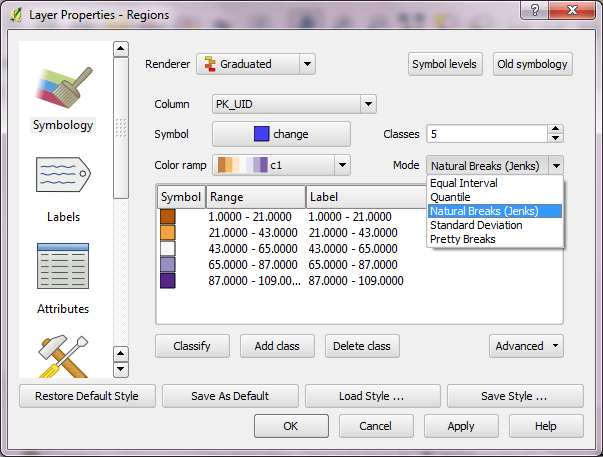
QGIS classification algorithms for layer symbology in current QGIS trunk version
Read more on his blog: “Playing around with classification algorithms: Python and QGIS” and “Adding a bit of class(ification) to QGIS…”
The aim of Time Manager plugin for QGIS is to provide comfortable browsing through temporal geodata. A dock widget provides a time slider and a configuration dialog for your layers to manage.

a wildlife telemetry dataset managed by Time Manager
Time Manager filters your vector datasets and displays only features with timestamps in the user specified time frame.

two views of the scenery, using a two-days time frame
Give it a try! The project website can be found at http://anitagraser.github.com/TimeManager/.
You can call almost any function in Python, using “grass.run_command(“function”, ….)”.
For your inspiration, you find GRASS Python scripts in their SVN.
Great news everyone: Since revision r14172, QGIS supports non-spatial tables! This means you can finally load your CSV files directly into QGIS and work with them, e.g. use “Join by attribute”.
Loading the CSV file is performed using “Add Vector layer”. (Yes, the terminology is a little confusing here.) The resulting layer will be shown in the legend list and the content can be view via attribute table.
Great work Marco!
While this is not a new addition to QGIS anymore – in fact it has been around since 1.4 – I feel it’s not as widely know as it should be: QGIS offers the power of ColorBrewer to create color ramps! And this is how you get to use this power:
All styles: marker, line, fill and color ramps can be accessed via “Style manager”:
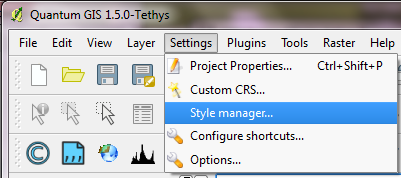
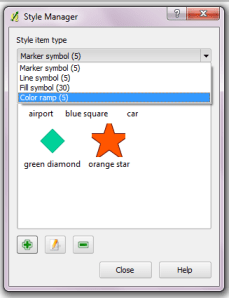
In Style Manager you can add, edit and delete styles:
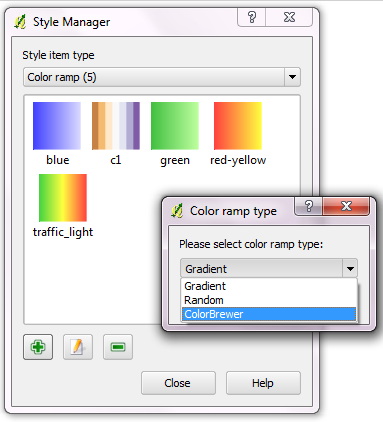
When creating a new color ramp, you get to choose between “Gradient”, “Random” and finally “ColorBrewer” ramp type. (By the way: You can create multi-color color ramps if you choose “Gradient”.)
When creating a ColorBrewer ramp, you can choose from various schemes and define how many colors your ramp should contain:
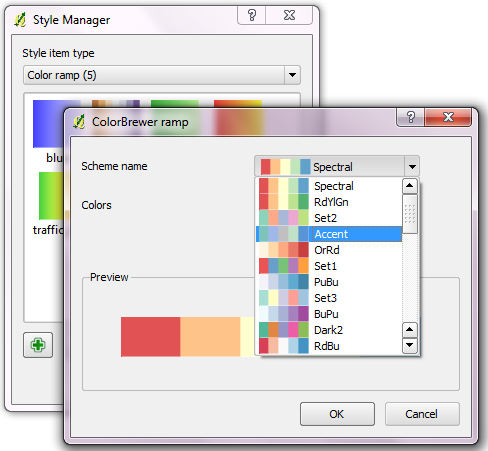
I love these new ramps and I wish I’d have discovered them sooner :)
Enjoy the power of ColorBrewer and QGIS!
QGIS Mapserver is now in QGIS trunk. Check Linfiniti Geo Blog to learn how to set it up and just how powerful this new server is. We’re all looking forward to see how QGIS Mapserver performs compared to older projects like UMN Mapserver and Geoserver at the WMS Benchmarking in Barcelona.
This year’s Google Summer of Code project for QGIS “QGIS on Steroids” has come to an successful end. The resulting improvements are currently available through http://svn.osgeo.org/qgis/branches/threading-branch/ and will be available in trunk after more testing.
Read Martin’s full report on QGIS wiki.
 Free and Open Source GIS Ramblings